4.4. Connections settings
The connection settings widget handles the configuration of database connections to be used by several features on pgModeler. The user has the ability to test the connection as he fills the connection attributes. All these attributes are based upon the PostgreSQL client library parameters, thus you can get detailed description about them on official documentation.
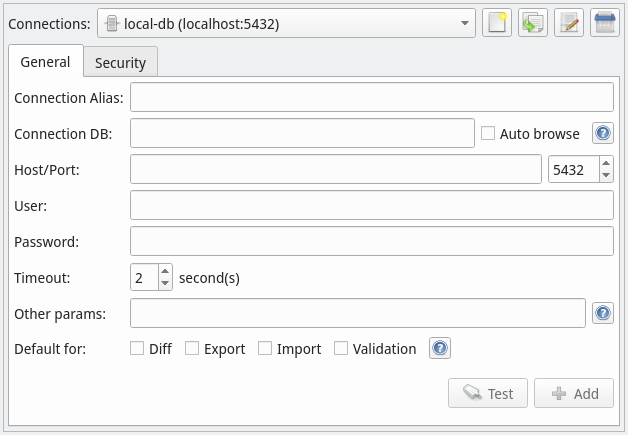
General
| Option/Action | Description |
|---|---|
Connections | Stores all the configured connections. The control buttons beside the combo box have, respectively, the actions: add a new connection, duplicate, edit and delete the selected connection. |
Connection Alias | Defines an alias for the connection. This alias is used to identify the connection when listing it on the connection's combo box. |
Connection DB | Initial database in which to connect. This is the first database to be accessed before start to manage the others. Generally this is the postgres database. |
Auto browse | Automatically browses the named database when using this connection to handle databases in Manage view. |
Host/Port | Network address and port in which the server is listening. The host can be an IP address or a FQDN (fully qualified domain name). |
User | The account used to access the initial database. It's recommended that this user has the needed permissions to create databases and read the system catalogs if you intend to use the export, import and diff features. |
Password | Password for the provided user account. If your server has enabled blank password authentication you can leave this field empty. |
Timeout | Connection timeout (in seconds). |
Other params | Additional connection parameters specified by the user. The values specified in this field must be separated by blank spaces and have the form attribute=value . |
Default for | This set of check boxes defines for which operations (diff, export, import and validation) this connection is used by default. |
Test button | Tests the configured connection. |
Add button | Add the configured connection to the memory (currently loaded settings) in order to save it to the connections.confwhen Apply is pressed. |
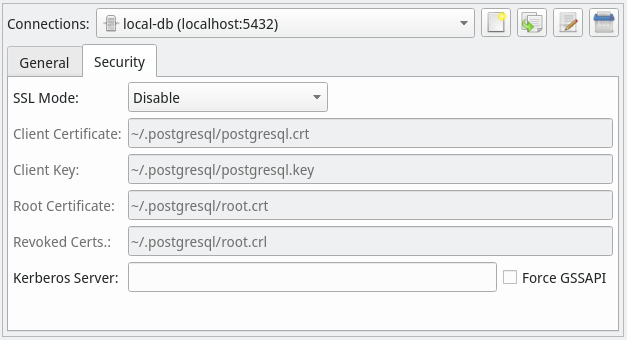
Security
| Option | Description |
|---|---|
SSL Mode | Enables the use of SSL when connecting to the server. The fields Client, Certificate, Client Key, Root Certificate, Revoked Certs. are used in conjunction with this one. |
Kerberos Server | Defines the server address for Kerberus based authentication. |
Force GSSAPI | This option has effect only when using Kerberos authentication and forces the connection to authenticate the credentials using the GSSAPI method. |
References
Connection parameters
https://www.postgresql.org/docs/current/static/libpq-connect.html#LIBPQ-PARAMKEYWORDS
SSL support
https://www.postgresql.org/docs/current/static/libpq-ssl.html