4.1. General settings
This configuration section reunites all general-purpose options that don't fit any other sections. In this widget, the user can change the behavior of some modeling features, some global options, and the printing settings.
4.1.1. General & Design
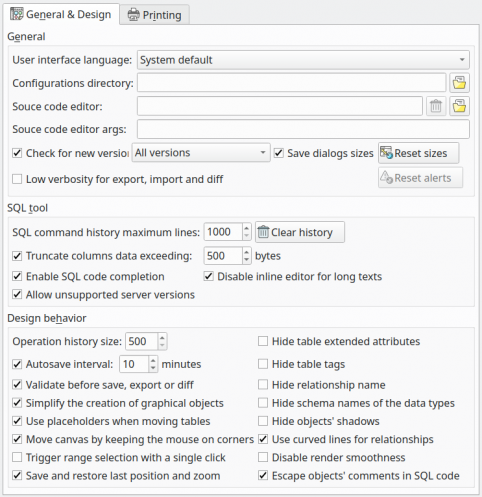
General
| Option/Action | Description |
|---|---|
User interface language | Overrides the default user interface language defined by the system. Requires restarting the program. |
Configurations directory | This read-only field stores the path the to settings folder for the current user. |
Source code editor | Defines the full path to a program to be used as an external source code editor. |
Source code editor args | Defines the arguments passed to the source code editor application. |
Save dialogs sizes | When checked this option causes pgModeler to save the last size and position of almost all dialogs over the application, restoring them every time they are activated. The state of the dialogs is persisted, which means, that their positions and sizes are restored even if the application is closed and open again. |
Reset sizes | This button resets all dialogs to their default sizes and positions. |
Reset alerts | This button resets alert statuses/choices regarding the unsaved models, the open SQL execution tabs, and the usage of the disambiguation convention for duplicated object names. |
Check new versions | Controls whether pgModeler should check for updates on startup. The combo box aside this option determines which versions must queried. |
Low verbosity for the export, import, and diff processes | Reduces the verbosity of the export, import, and diff process causing only key info messages and errors to be displayed. This option causes fewer rendering operations to be performed when displaying progress messages and, as a consequence, it makes these processes run faster. |
SQL Tool
| Option/Action | Description |
|---|---|
SQL command history maximum lines | Defines the maximum length (in lines) of the command history in the SQL execution pane at Manage view. Once the limit is reached a portion of the older history is automatically cleared. |
Clear history | This button clears the entire command history. |
Truncate columns data exceeding X bytes | Toggles the automatic truncation of columns' data in the results grid when exceeding a specified threshold. Columns exceeding the specified number of bytes are automatically truncated to the maximum length. This threshold only affects text display. When editing column data the original values are displayed instead of the truncated ones. This improves performance when displaying/handling columns with lots of data. |
Disable inline editor for long texts | In data manipulation form, long texts that exceed the truncation threshold will be displayed in an input form instead of opening an inline editor in the data grid. |
Allow unsupported PostgreSQL versions | pgModeler will try to connect to older server versions (below 10) in a minimum compatibility mode. Checking this option may bring some risks of data loss and may cause the diff and import processes to fail or produce unreliable results. |
Design behavior
| Option/Action | Description |
|---|---|
Autosave interval (minutes) | Defines the period when the opened models will be saved automatically. |
Operation history size | Defines the maximum amount of elements held in the operation history. Once reached the maximum number the history is automatically cleaned. |
Validate before save, export or diff | Triggers a dialog asking the user to validate the model before a save, export, or diff operation. |
Simplify the creation of graphical objects | Graphical objects (table, views, and textboxes) will be created in a single step without the need to click on the canvas. |
Use placeholders when moving tables | When enabled this option creates a placeholder object at the previous table's position when starting to move it. This will cause graphical updates on relationship lines to be performed only when the drag & drop action is done improving the performance. Disabling placeholders will cause those updates to be executed every time the table's position changes a single pixel (classical behavior). |
Move canvas by keeping the mouse on corners | Start moving the canvas when the cursor is on the canvas edges. |
Trigger range selection with a single click | By default, the range selection is triggered with Shift + left click. By checking this option the range selection will be activated only with a single click and move. |
Save and restore last position and zoom | After loading the model the last zoom and position on canvas will be restored. |
Hide table extended attributes | Hide the portion of the table that represents triggers, indexes, and rules. |
Hide table tags | Hide the object that represents the tag assigned to the table. |
Hide relationship name | Hide the object that represents the relationship name. |
Hide schema names of the data types | Hide the schema names of the user-defined types referenced by columns. This option affects only the graphical objects, the code generation will keep displaying user-defined type names fully schema-qualified. |
Use curved lines for relationships | Replace any straight line in a relationship with curved ones to improve the model's visualization. |
Enable SQL code completion | Toggles the code completion in all fields that accept the input of SQL commands. |
Disable render smoothness | Disable the antialiasing for lines and texts improving performance when handling huge models. |
Escape objects' comments in SQL code | Forces the escaping of line breaks and tabulations in objects' comments during SQL code generation. This option produces a more compact SQL code since all comments will be presented in one line. Despite changing the presentation this option doesn't affect the final semantics of multi-lined comments. |
4.1.2. Printing
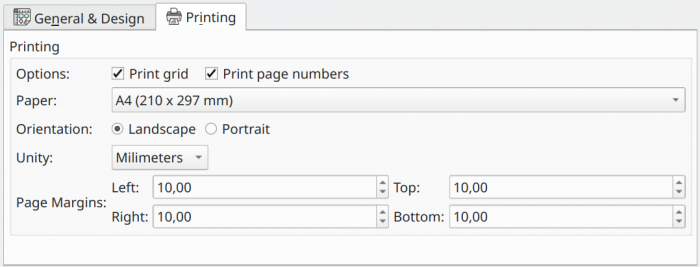
Printing
| Option/Action | Description |
|---|---|
Print grid | Enables pgModeler to print the canvas grid. |
Print page numbers | Enables pgModeler to print the page delimiter lines. |
Paper | Configures the paper dimensions for printing. When this field is configured with Custom value the user needs to configure the paper size using the Page Margins field. Changes in this field directly affect the drawing of the page delimiters on the canvas area. |
Orientation | Defines the page orientation. This option directly affects the drawing of page delimiters on the canvas area. |
Unity | Defines the unit of measure to be used when configuring the page margins. |
Page Margins | Defines the page margins or the distance of the objects from the page borders on the printing. This field also holds the custom paper size when the field Paper is configured with Custom value. |