1.2.6. Multi-scene models
Models with hundreds or thousands of tables become slow to render and hard to navigate when everything lives on a single canvas. Starting with version 2.0, pgModeler can segment a model into multiple scenes. Each scene is an independent canvas that holds a subset of the model's tables, views and foreign tables, and you switch between scenes without leaving the design view.
Segmentation is optional. A model with no segmentation behaves exactly as in previous versions: all objects are on a single canvas.
 123456
| Scene information | ||
|---|---|---|
| # | Field | Description |
| 1 | Relationships visibility | Toggles the visibility of the relationships between tables of the same scene. When they are not visible, they are represented by the relationship marker of each table, whose details are shown by double-clicking it. Hiding the relationships is intended for large models, where the drawn relationships lose their purpose. NOTE: The change takes effect only after saving and reloading the model. |
| 2 | Segmentation mode | Determines the model's segmentation mode. None: All objects are created on a single scene (canvas). This is the classic behavior. By schema: Each schema defines a new scene (canvas) where tables, views, and foreign tables are routed according to their parent schemas. By threshold: Whenever the number of tables, views, or foreign tables reaches a multiple of the defined threshold, a new scene (canvas) is created and new objects are routed to it. NOTE: Schemas' visual representations are disabled when the model is segmented. |
| 3 | Segmentation threshold | Segmentation threshold. The number of tables, views, or foreign tables created before a new scene is created and new objects are routed to it. |
| 4 | Active scene | The currently focused scene. |
| 5 | Previous scene | Navigate to the previous scene. |
| 6 | Next scene | Navigate to the next scene. |
The bar also shows the canvas information (pointer position, zoom and selection), and the Previous scene / Next scene buttons are visible only in segmented models.
Segmentation modes
The segmentation mode is a property of the model and is saved in the model file.
| Mode | Behavior |
|---|---|
| None | All objects are created on a single scene. This is the classic behavior. |
| By schema | Each schema defines a scene. Tables, views and foreign tables are routed to the scene of their parent schema. |
| By threshold | Every time the number of tables, views or foreign tables reaches a multiple of the threshold, a new scene is created and new objects are routed to it. |
When a model is segmented, the visual representation of schemas is disabled.
The threshold is the number of tables, views or foreign tables per scene. The default is 500 and the field accepts values from 500 to 2500.
Choosing the mode
You can define the segmentation:
- When importing a database, in the Segmentation option of the import form (also Hide relationships, see below). The import form is described in 5.2. Import a database.
- On an existing model, with the segmentation mode and threshold controls of the scene information bar.
- From the command line, with
pgmodeler-cli --import-db --seg-mode, see Command line interface.
Changing the segmentation mode or the threshold of an existing model takes effect only after the model is saved and reloaded. pgModeler asks for confirmation and offers to save and reload the model right away.
When you open a model whose objects are concentrated in very few scenes, pgModeler suggests switching to the other segmentation mode. The suggestion is made only when the model file has no segmentation mode defined and at least 80% of the objects belong to a single schema.
Navigating between scenes
The scene information bar shows the active scene. Use the combo box to pick a scene by name, or the Previous scene / Next scene buttons. In By schema mode the scenes are named after their schemas; in By threshold mode they are named Scene 1, Scene 2 and so on.
Several operations take scenes into account:
- Selection, object search and layers work across all scenes, or follow the scene of the clicked object.
- Rearrange objects can be applied to the active scene only or to all scenes. In a segmented model with more than one scene, pgModeler asks how the rearrangement should be applied: This scene only or All scenes.
- Move to scene (object quick actions) moves the selected tables, views, foreign tables and textboxes to another scene. Other object types are ignored, and in By schema mode objects cannot be moved out of their schema's scene.
- PNG and SVG export produces one image per scene instead of a single image of the whole model.
Relationships between scenes
A relationship line cannot cross scenes. When a table has a relationship with a table in another scene, the table shows a relationship marker instead of the line.
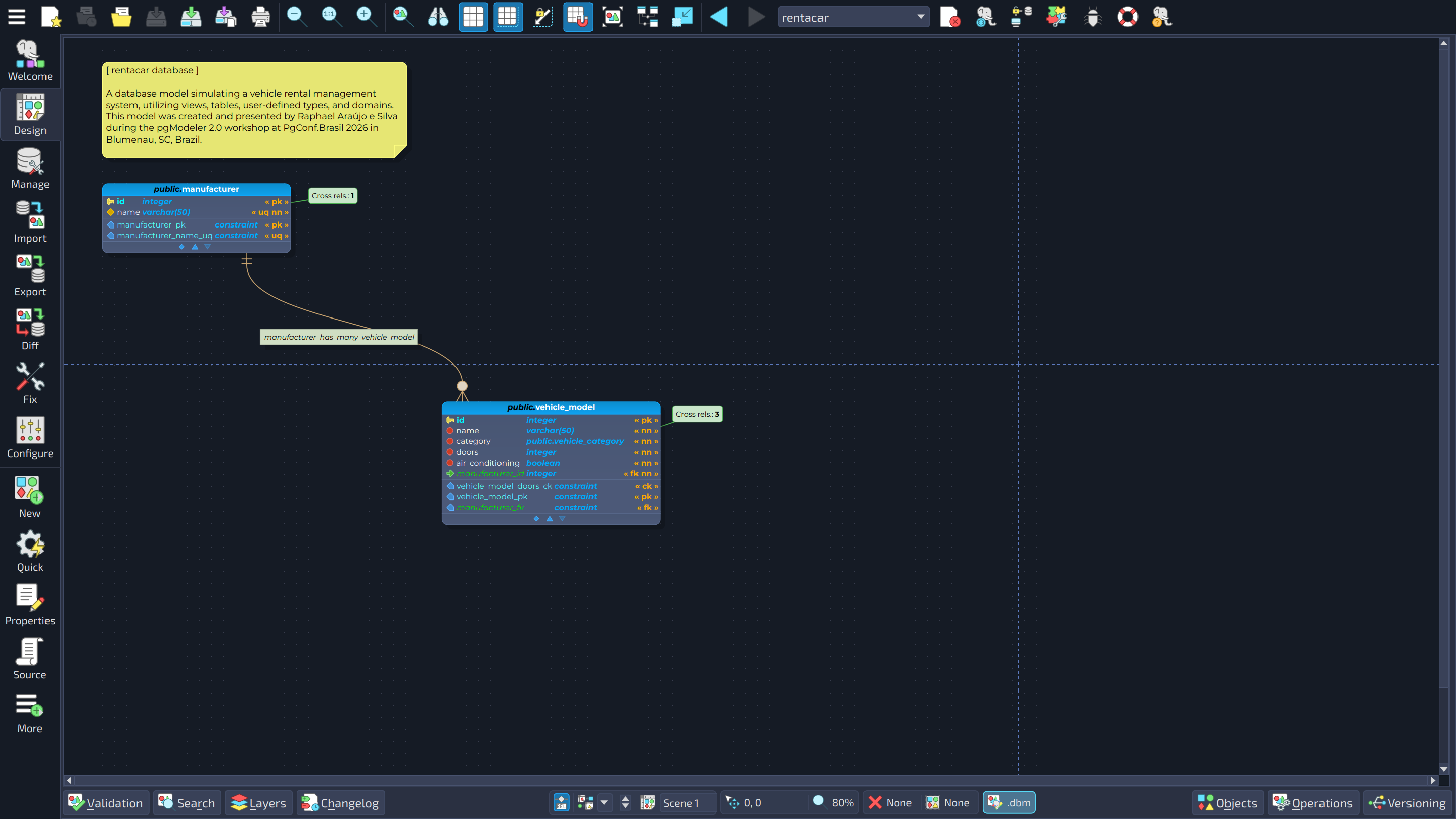
In the image, the tables manufacturer and vehicle_model show the marker Cross rels. with the number of relationships they have with tables placed in other scenes.
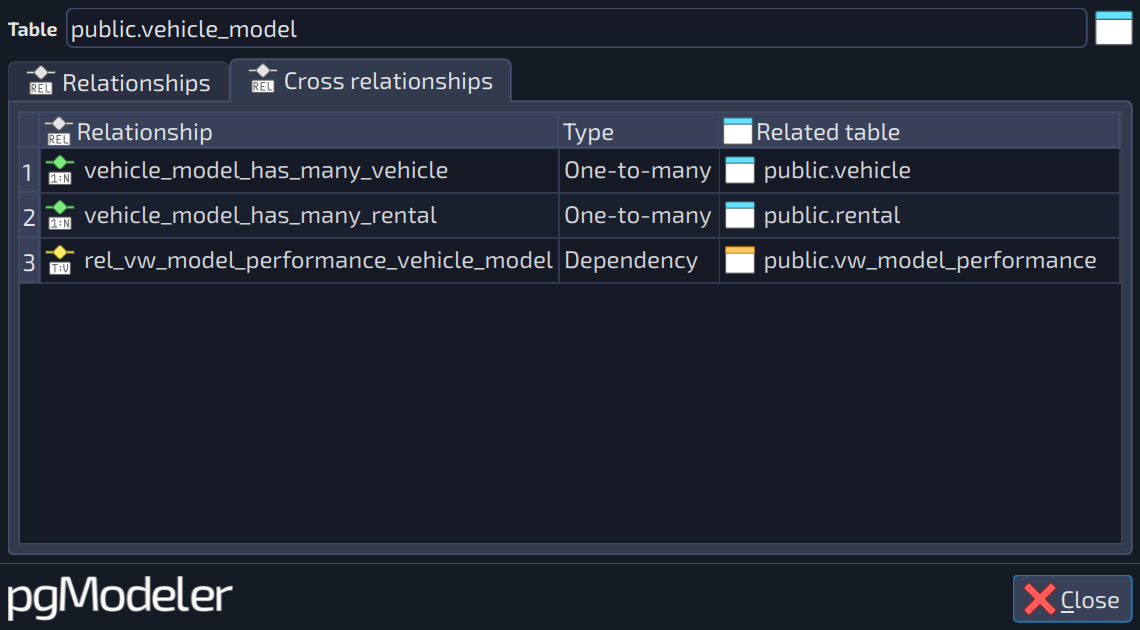
Double-click the marker to open a read-only dialog, titled Relationships of followed by the table name, with two tabs: Relationships, which lists the relationships hidden because they are between tables of the same scene (see the next section), and Cross relationships. Both grids show the Relationship name, the Type and the Related table, they are sortable, and double-clicking a row navigates to the relationship or to the related table.
Hiding relationships of the same scene
For very large models, even the relationships between tables of the same scene lose their purpose. The Hide relationships option (toggle button  in the scene information bar, option in the import form,
 --hide-rels in the CLI) represents them through the same relationship marker. pgModeler suggests this option when the model has 2000 or more relationships. The change takes effect after the model is saved and reloaded.
Command line
pgmodeler-cli --import-db accepts the options below to segment the model produced by the import.
| Option | Description |
|---|---|
--seg-mode, -se [MODE] | Segments the imported model's canvas into multiple scenes. Available modes: schema, threshold. |
--seg-threshold, -th [NUMBER] | Number of tables/views/foreign tables per scene. Only for --seg-mode threshold. |
--hide-rels, -hr | Hides the relationships between tables of the same scene in the imported model. |
The complete list of CLI options is in 6.13. Command line interface.
The model fix (--fix-model, --fix-sdbm) preserves the segmentation data of the model.