3.33. User-defined types
User-defined types are objects that create new data types that can be used by other objects in the database. In PostgreSQL, it's possible to configure four kinds of user-defined types, namely: base, enumeration, composite, and range. Each type has its own set of attributes and configuration complexity, so, to explain them better, this section is divided into four subsections, each one detailing a type separately.
Base types
Base or scalar types are elementary data types used in the same way as the PostgreSQL built-in ones. Creating base types is quite advanced and requires the use of C-based functions. Details about these functions will not be covered by this documentation.
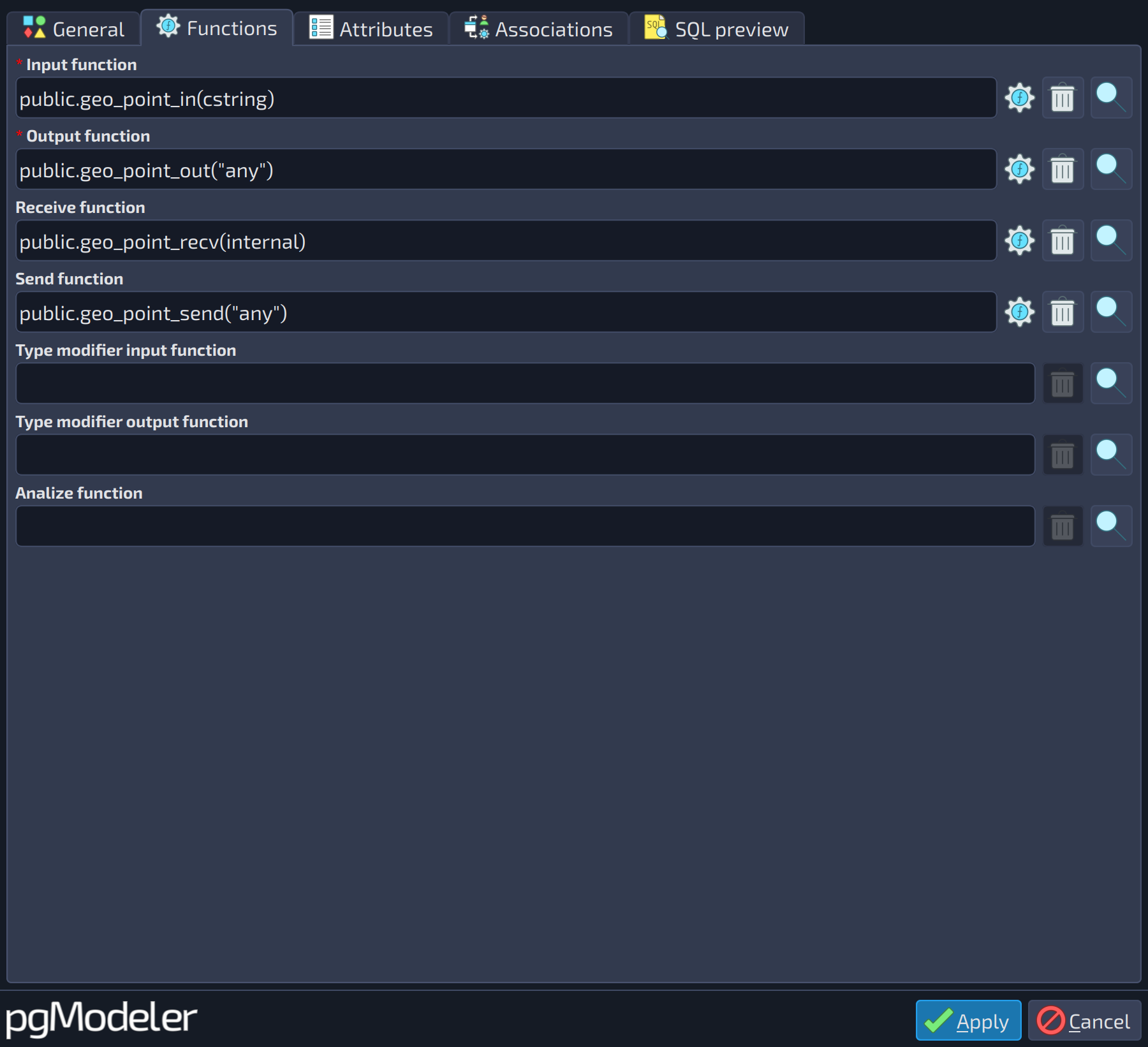
In general, to create a base type, you will need to define at least two functions called, respectively, input and output. The input function converts the external textual representation of the type to its internal representation. The output function does the reverse operation, that is, it converts the type from its internal representation to an external textual one. Other optional attributes can be assigned to the type, and they are described in the table below.
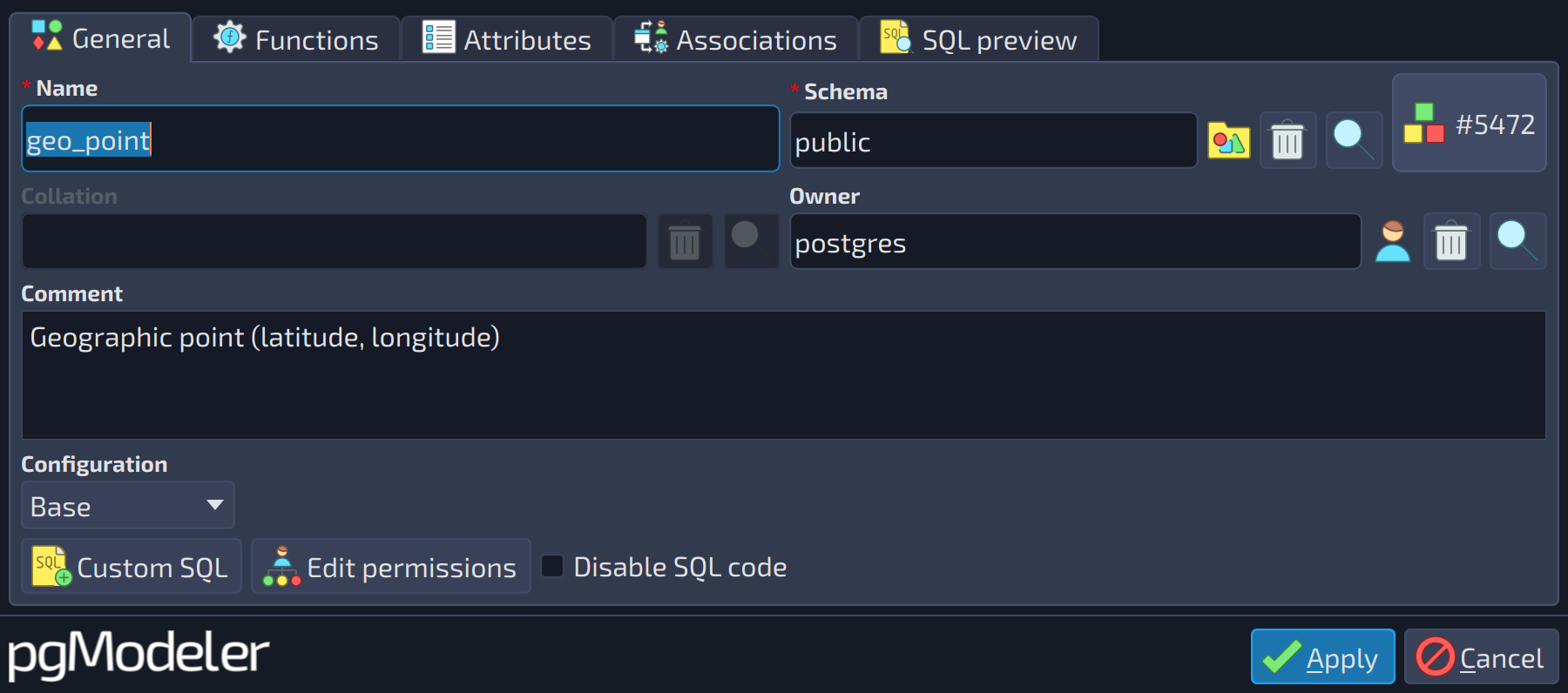
Due to the number of attributes used to create base types, pgModeler separates them into two tabs: Functions and Attributes. The first tab is used to configure the two mandatory functions as well as other optional ones, and the second tab is used to configure advanced attributes for the type. You seldom need to use the advanced attributes, but they are present for those users intending to create a more elaborate data type.
 1
1
| General | ||
|---|---|---|
| # | Field | Description |
| 1 | Configuration | The kind of user-defined type being configured: base, composite, enumeration, or range. Changing it switches the form to the fields of that kind. |
 1234567
| Functions | ||
|---|---|---|
| # | Field | Description |
| 1 | INPUT | This function converts the external textual representation of the type to its internal representation. This function should have the signature: |
| 2 | OUTPUT | This function converts the internal representation of the type to its external textual representation. This function should have the signature: |
| 3 | RECV | This function converts the external binary representation of the type to its internal representation. This function should have the signature: |
| 4 | SEND | This function converts the internal representation of the type to its external binary representation. This function should have the signature: |
| 5 | TPMOD_IN | This function validates and encodes the literal type modifier of the type being created. An example of a type modifier is the length of |
| 6 | TPMOD_OUT | This function converts the internal type modifier representation (single non-negative integer) back to the literal representation. This function should have the signature: |
| 7 | ANALYZE | This function is responsible for performing type-specific statistics collection for the columns of the data type being created. It must have the signature: |
Note: Unlike what is stated in the official documentation, the functions INPUT, OUTPUT, RECV, and SEND (and the CANONICAL function of range types) should be constructed using the any data type where the name of the new data type should appear. This is merely a placeholder, and pgModeler replaces any with the name of the type being configured when generating the SQL code.
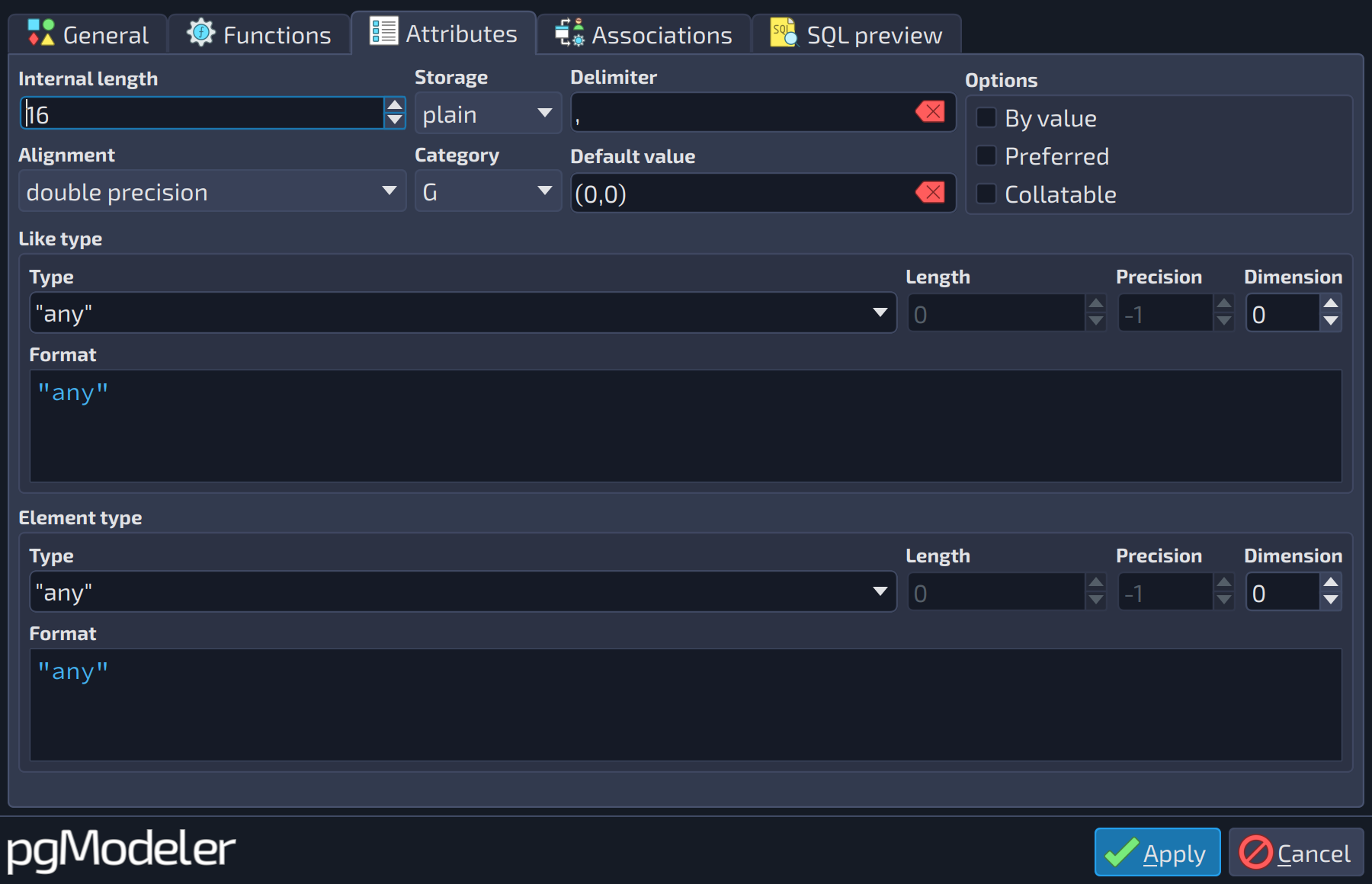
Continuing to detail the base type, the image below shows the advanced attributes used to create a more detailed data type. Most of them are rarely used, but all of them are described below.
 12345678910111213141516171819
| Attributes | |||
|---|---|---|---|
| # | Field | Group box | Description |
| 1 | Internal length | Defines the internal length of the type being configured, in bytes. The default value | |
| 2 | Storage | Specifies the storage mode for a variable-length type. Four modes are accepted: | |
| 3 | Delimiter | Defines the character used as the delimiter between values when this type is used as an array. | |
| 4 | By value | Options | Values of the new type are passed by value rather than by reference. |
| 5 | Preferred | Options | The type is the preferred one in its category. |
| 6 | Alignment | Specifies the storage alignment of the new type. Four values are accepted: | |
| 7 | Category | Specifies the category the new data type belongs to. Details about categories can be found in the official PostgreSQL documentation. | |
| 8 | Default value | Defines the default value for the data type. | |
| 9 | Collatable | Options | Operations on the type can use a collation. |
| 10 | Type | Like type | The data type. Besides the built-in types, the list also holds the user-defined types, domains and other types of the model. |
| 11 | Length | Like type | Length, or number of characters or bits, for the types that accept one, like |
| 12 | Precision | Like type | Precision, for the types that accept it, like |
| 13 | Dimension | Like type | Number of dimensions when the type is an array ( |
| 14 | Format | Like type | Read-only preview of the data type as it is written in the SQL code, with length, precision, dimension and other modifiers applied. |
| 15 | Type | Element type | The data type. Besides the built-in types, the list also holds the user-defined types, domains and other types of the model. |
| 16 | Length | Element type | Length, or number of characters or bits, for the types that accept one, like |
| 17 | Precision | Element type | Precision, for the types that accept it, like |
| 18 | Dimension | Element type | Number of dimensions when the type is an array ( |
| 19 | Format | Element type | Read-only preview of the data type as it is written in the SQL code, with length, precision, dimension and other modifiers applied. |
Enumeration types
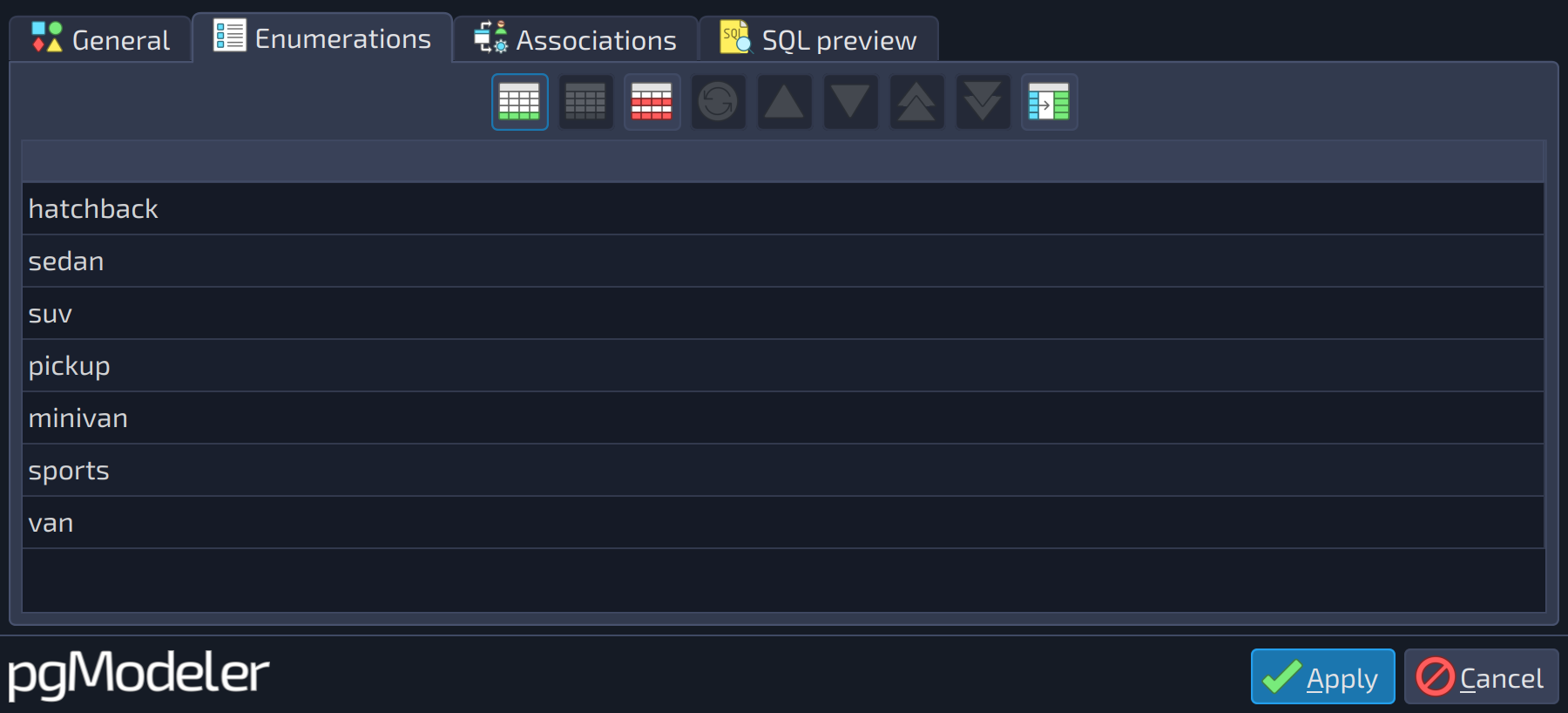
Enumeration types are data types that are composed of a static set of literal values. This data type is equivalent to the enum types existent in many of the programming languages. Its attributes are described below.
 1
1
| Enumerations | ||
|---|---|---|
| # | Field | Description |
| 1 | Enumerations | The set of enumeration values of the type. To create a new element, click the add button |
 of the grid toolbar and type the value in the new row.
Composite types
Composite types are objects that contain a set of named attributes, each one with its own data type. These types resemble the structs present in some programming languages. Additionally, a composite type is basically the same as a row data type of a table, but the advantage of the former is that users don't need to explicitly create a table when all that is desired is to define a single type. Composite types can be quite useful as function arguments and return types.
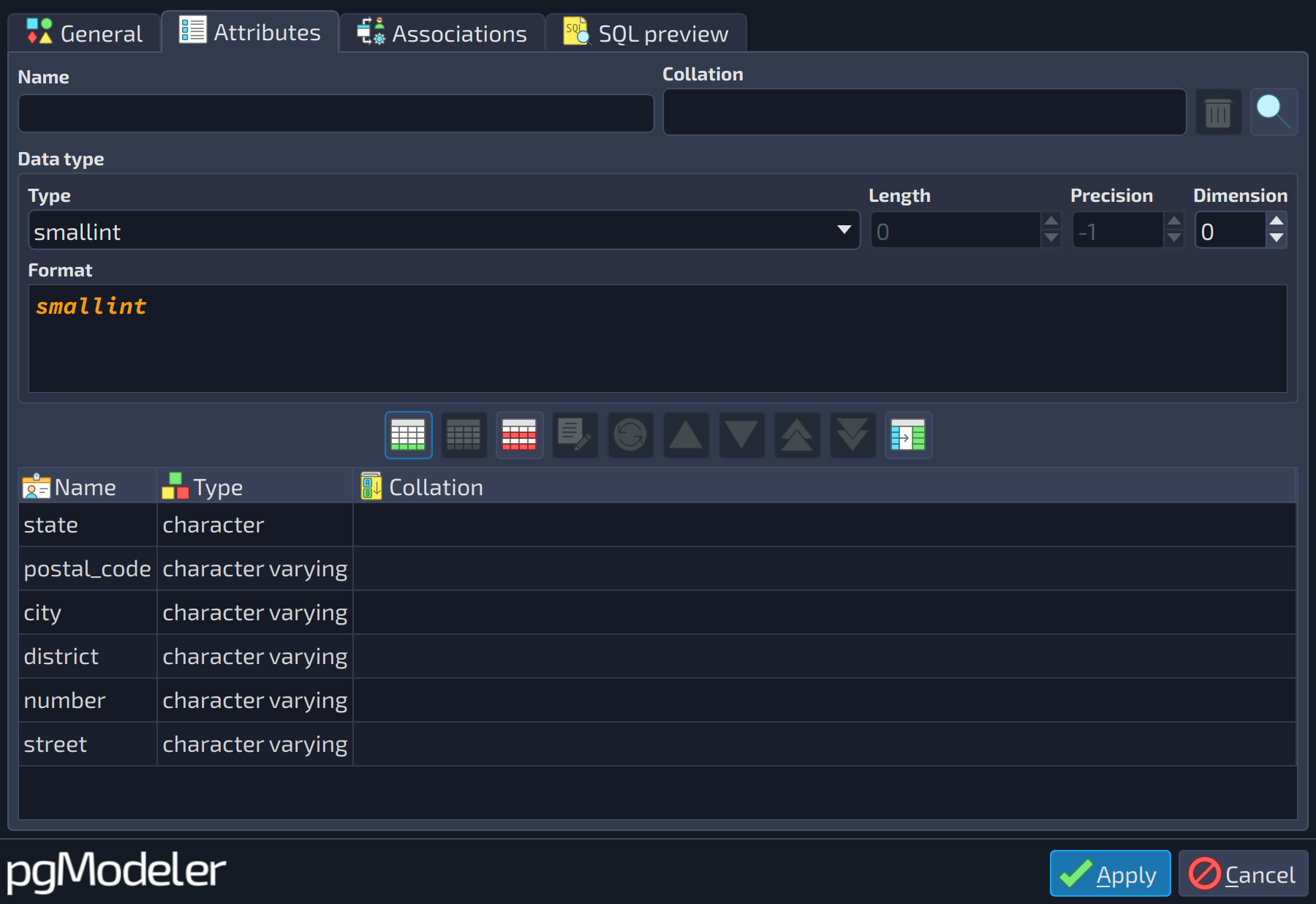 12345678
| Attributes | |||
|---|---|---|---|
| # | Field | Group box | Description |
| 1 | Name | The name of an attribute of the type. | |
| 2 | Collation | The collation applied to the object, which overrides the default one. Use the buttons | |
| 3 | Type | Data type | The data type. Besides the built-in types, the list also holds the user-defined types, domains and other types of the model. |
| 4 | Length | Data type | Length, or number of characters or bits, for the types that accept one, like |
| 5 | Precision | Data type | Precision, for the types that accept it, like |
| 6 | Dimension | Data type | Number of dimensions when the type is an array ( |
| 7 | Format | Data type | Read-only preview of the data type as it is written in the SQL code, with length, precision, dimension and other modifiers applied. |
| 8 | Attributes | The attributes of the composite type (name, data type, and collation). Configure the name and data type in the fields above and use the add button | |

 beside the field to pick a collation from the model or clear the field.
Range types
Range data types represent an interval of values of an element type (also known as a range subtype). These types are very useful because they are capable of representing many element values in a single range value. In other words, range types can be used when you need to work with an interval of values without the need to create auxiliary columns to denote their start and end. For instance, let's say you need to create a range of timestamp values. Instead of using two columns like start_date and end_date, you can just use one column configured with the built-in type tsrange (timestamp range). This type will handle all the operations needed to compare a single value against the entire range and many other features. A complete list of built-in range data types is available in the PostgreSQL manuals.
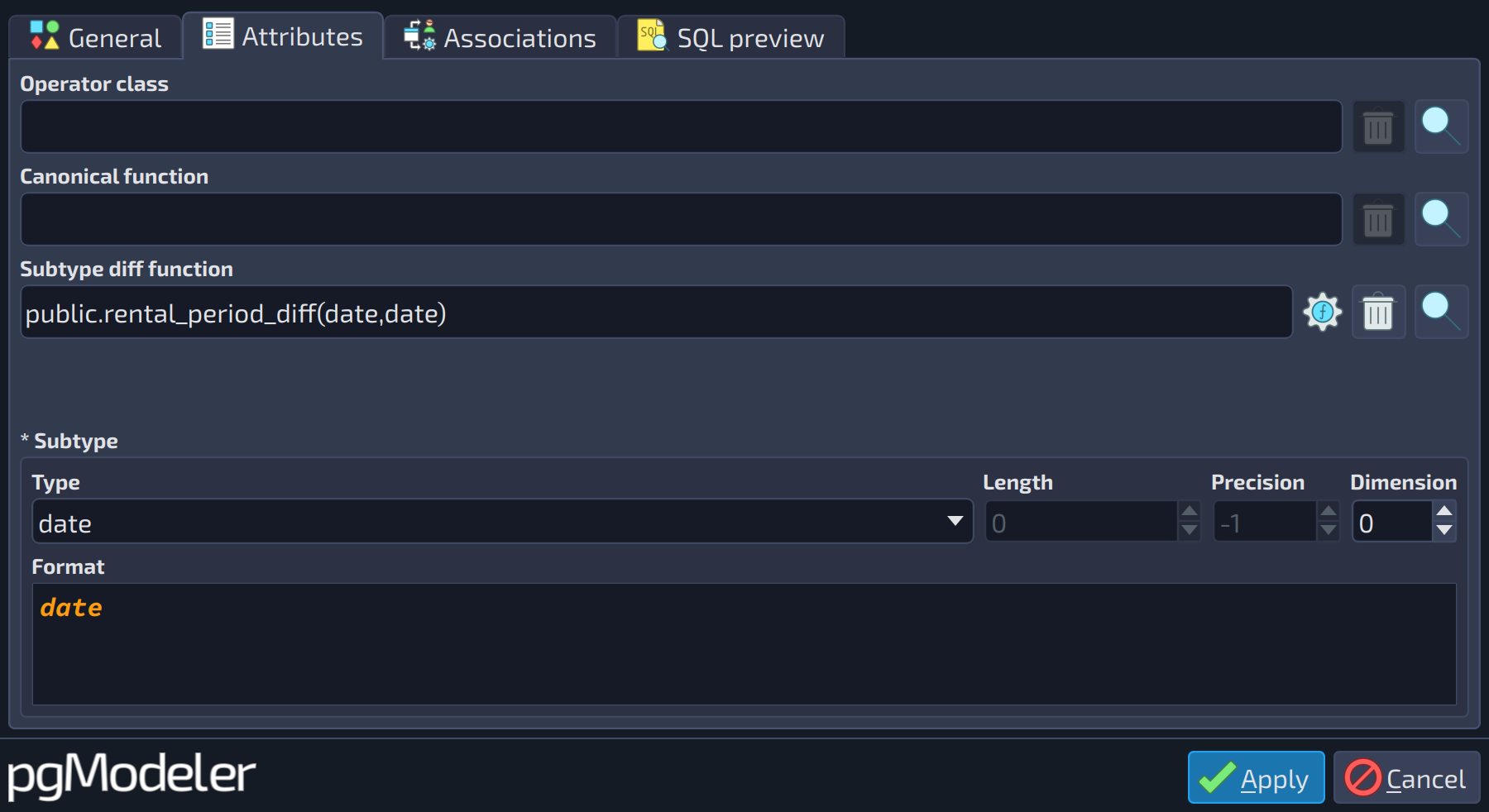 12345678
| Attributes | |||
|---|---|---|---|
| # | Field | Group box | Description |
| 1 | Operator class | The | |
| 2 | Canonical function | This function is used to convert the internal values of the range to a canonical form. It must have the signature: | |
| 3 | Subtype diff function | This function compares two values of the | |
| 4 | Subtype | The element type (subtype) of the range type. | |
| 5 | Length | Subtype | Length, or number of characters or bits, for the types that accept one, like |
| 6 | Precision | Subtype | Precision, for the types that accept it, like |
| 7 | Dimension | Subtype | Number of dimensions when the type is an array ( |
| 8 | Format | Subtype | Read-only preview of the data type as it is written in the SQL code, with length, precision, dimension and other modifiers applied. |
The editing form of all kinds of user-defined types has the tab General (shown above for base types, where the field Configuration selects the kind of type). The tabs Associations and SQL preview are common to every object and are described in the introduction of this chapter.
References
User-defined types DDL
https://www.postgresql.org/docs/current/static/sql-createtype.html
Data type categories
https://www.postgresql.org/docs/current/static/catalog-pg-type.html#CATALOG-TYPCATEGORY-TABLE
Enum types details
https://www.postgresql.org/docs/current/static/datatype-enum.html
Range types details
http://www.postgresql.org/docs/current/static/rangetypes.html