4.4. Connections settings
The connection settings widget handles the configuration of database connections to be used by several features in pgModeler. All the connection attributes are based on the PostgreSQL client library parameters, thus you can get a detailed description of them in the official documentation.
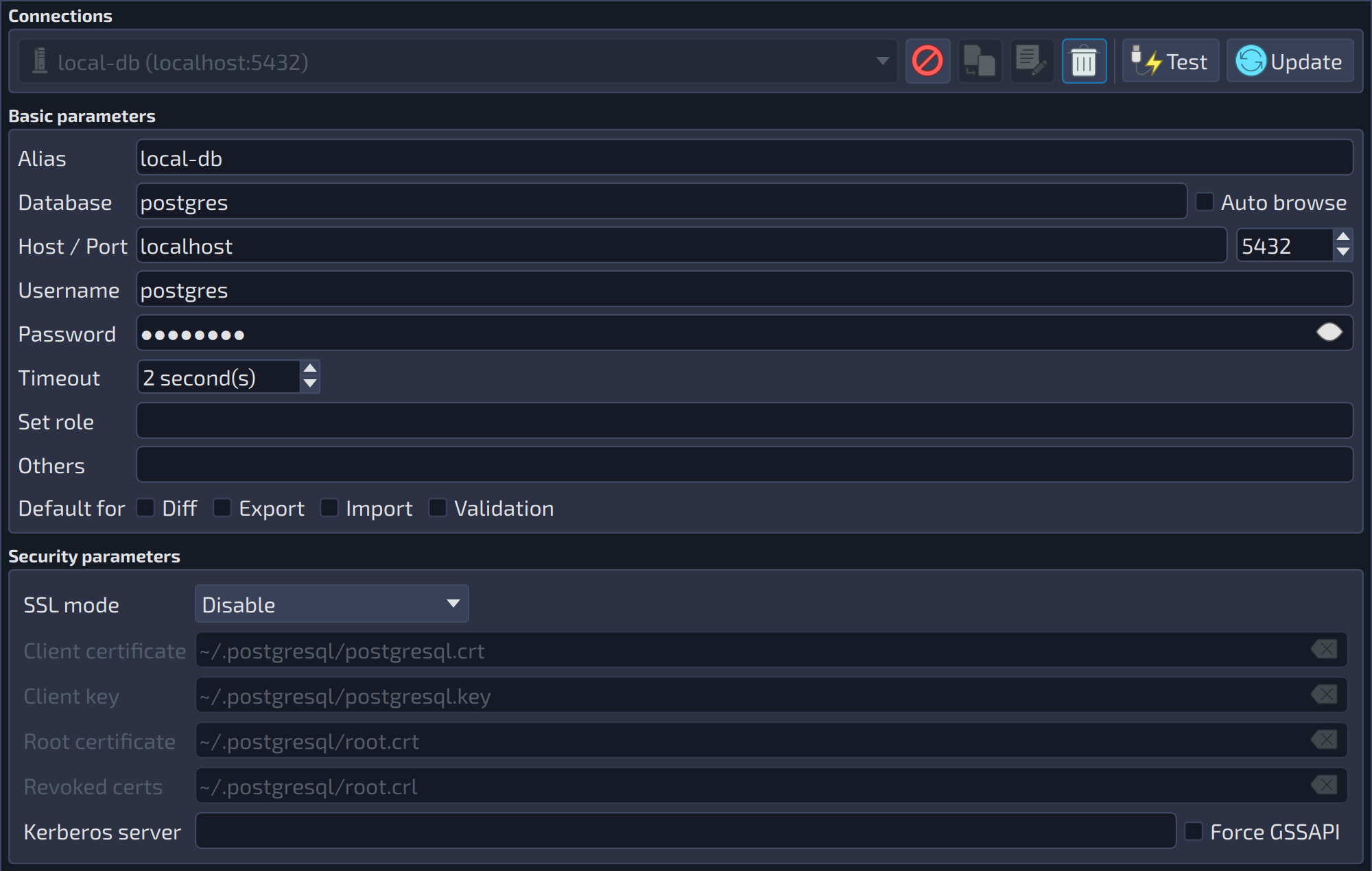 12345678910111213141516171819202122232425262728
| Connections | ||
|---|---|---|
| # | Field | Description |
| 1 | Connections | Lists all the configured connections. The New |
| 2 | Cancel editing | Cancel |
| 3 | Duplicate connection | Duplicate |
| 4 | Edit connection | Edit |
| 5 | Delete connection | Delete |
| 6 | Test | Test |
| 7 | Add / Update | Add |
 button, which starts a new connection, is not shown in the capture because it is hidden while a connection is being edited. The other buttons beside the list are described below.
 : cancels the editing of the selected connection.
 : creates a copy of the selected connection to be edited and added with another alias.
 : loads the selected connection in the fields below so it can be edited.
 : deletes the selected connection.
 : tests the connection with the configured parameters. On success, a message shows the details of the server: process ID (PID), protocol, version, and encoding. The button is enabled when the alias, host, user, and database are filled.
 / Update
  : adds the new connection to the list or, while a connection is being edited, updates it with the values of the form (the button takes the place of
 | Basic parameters | ||
|---|---|---|
| # | Field | Description |
| 8 | Alias | Defines an alias for the connection. The alias identifies the connection in the combo boxes where connections are listed. It is required to test and save the connection. |
| 9 | Database | The initial database to connect to. This is the first database accessed before starting to manage the others. Generally, this is the |
| 10 | Auto browse | Automatically browses the named database when this connection is used to manage databases in the Manage view. |
| 11 | Host / Port | The network address of the server. It can be an IP address or an FQDN (fully qualified domain name). It is required to test and save the connection. |
| 12 | Port | The port number of the server. It is paired with the host field. |
| 13 | Username | The account used to access the initial database. It is recommended that this user has permissions to create databases and to read the system catalogs if you intend to use the export, import, and diff features. It is required to test and save the connection. |
| 14 | Password | The password of the user account. If the server allows authentication without a password, you can leave this field empty. The button at the end of the field |
| 15 | Timeout | Connection timeout, in seconds. |
| 16 | Set role | When successfully connecting to the database the current user will be switched to the one specified in this field via SET ROLE \[role_name]. |
| 17 | Others | Additional connection parameters, in the form |
| 18 | Diff (default for) | Uses this connection by default in the Diff view. The check boxes |
| 19 | Export (default for) | Uses this connection by default in the Export view. |
| 20 | Import (default for) | Uses this connection by default in the Import view. |
| 21 | Validation (default for) | Uses this connection by default in the validation of the model. |
 shows the password in plain text and
  hides it again.
| Security parameters | ||
|---|---|---|
| # | Field | Description |
| 22 | SSL mode | Defines how SSL is used in the connection: |
| 23 | Client certificate | Path of the client SSL certificate file ( |
| 24 | Client key | Path of the secret key file used by the client certificate ( |
| 25 | Root certificate | Path of the file with the SSL certificate authority (CA) certificates used to verify the server ( |
| 26 | Revoked certs | Path of the SSL certificate revocation list (CRL) file ( |
| 27 | Kerberos server | Defines the server address for Kerberos-based authentication. draft |
| 28 | Force GSSAPI | This option has effect only when Kerberos authentication is used. It forces the connection to authenticate the credentials with the GSSAPI library ( |
WARNING: Connections' passwords are stored in plain text format in the settings. To avoid security issues, either prefer using SSL certificates in connections or make sure to protect the access to the directory where pgModeler settings are saved in the local user's storage (OS-dependent) from users other than the one running the tool. There are plans to encrypt stored passwords in future releases.
References
Connection parameters
https://www.postgresql.org/docs/current/static/libpq-connect.html#LIBPQ-PARAMKEYWORDS
SSL support
https://www.postgresql.org/docs/current/static/libpq-ssl.html