6.6. Operations history
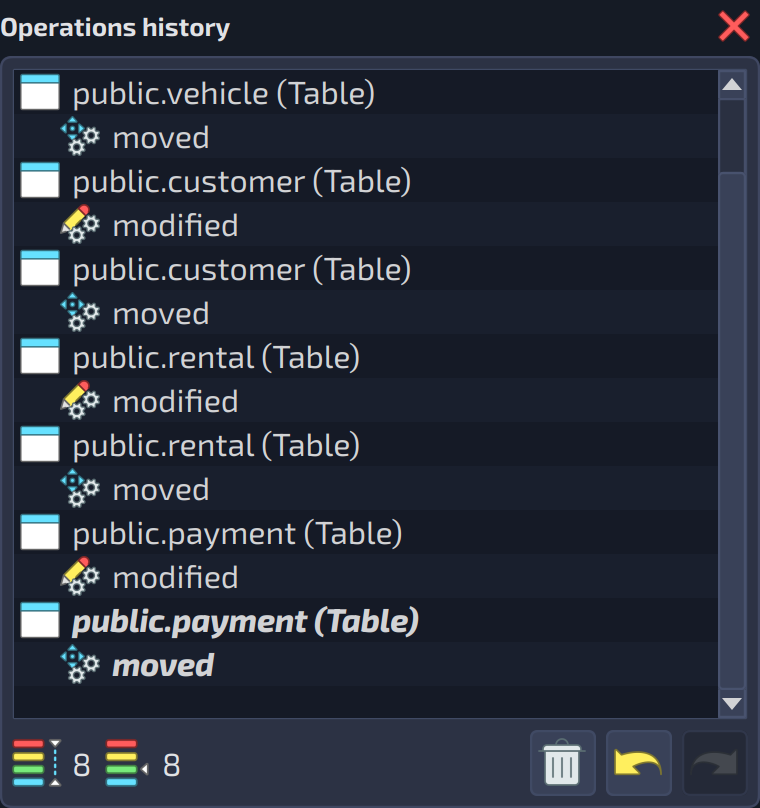
The operation history widget registers all operations done over the objects by detailing the object type, name, and the operation executed (see image below). By using this strategy, pgModeler gives the user a chance to undo or redo operations in case of accidental modifications. To undo some operations you can use the shortcut Ctrl + Z or click the button  ; to redo an operation, you can press the shortcut keys
 Ctrl + Y or use the command button  .
.
Despite its simple appearance, this is a complex component because it keeps live objects on a memory pool that demands periodic scans to check which objects are not used anymore, and consequently, remove them to free the portion of memory used. Because of this mechanism, memory and processor usage may increase, depending on the number of objects registered in the operations history.
Even though an automatic clearing process runs under certain conditions, you can force the memory release by clicking the button  . This is an irreversible process and will remove all objects kept in the memory pool. Finally, you can control the number of objects kept in the history through the main settings (see section General settings in Chapter 4).