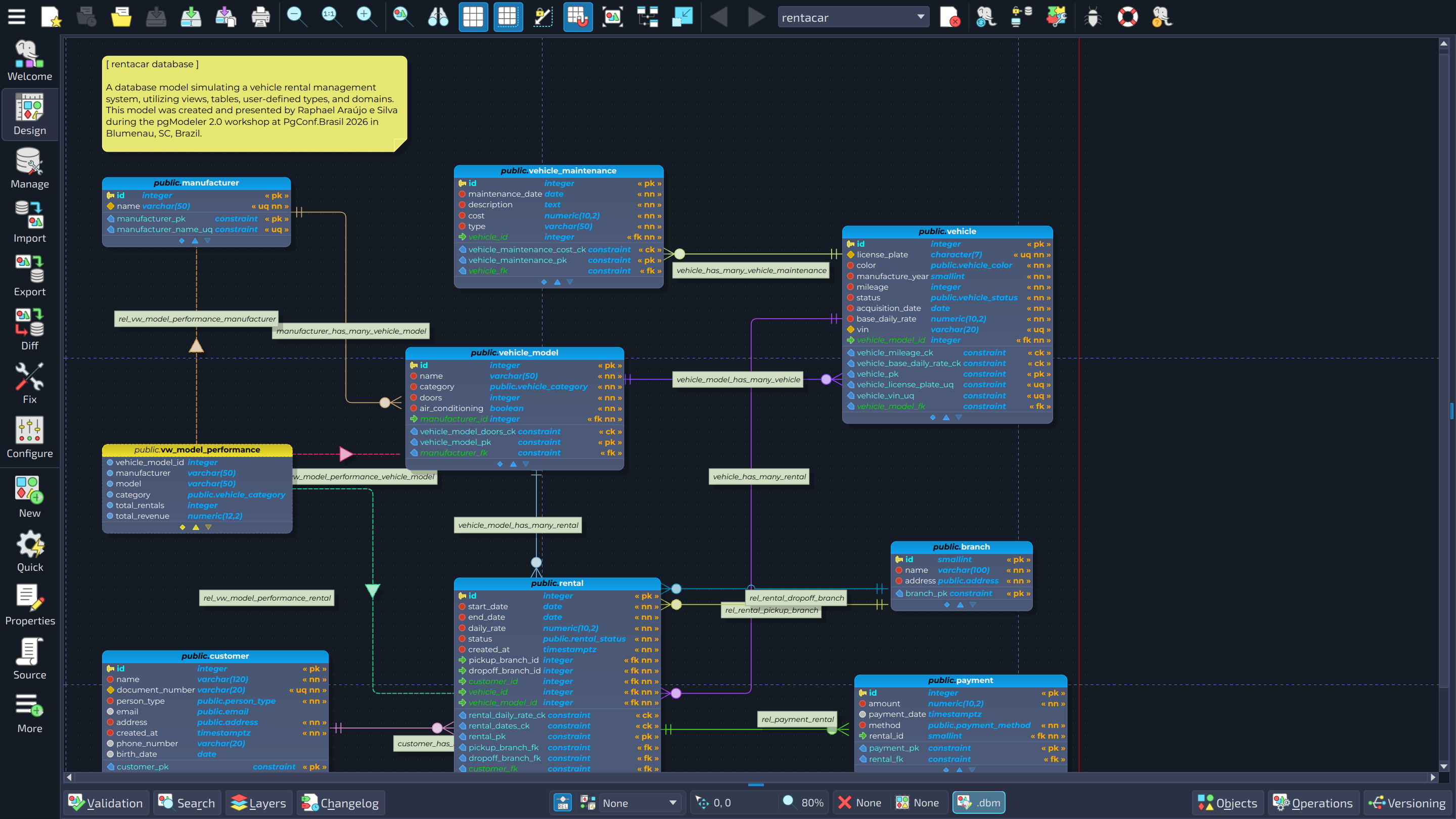
Today is a day I have been looking forward to for a long time. 🎉
After an alpha, an alpha1, a beta, and a beta1, pgModeler 2.0.0 is stable and ready for production. It is the direct successor of the 1.2.x series, and without exaggeration the biggest release the project has ever had. More than a year of work went into it: redesigned screens, a rebuilt foundation, new tools, a new edition, and a long hunt for crashes and memory leaks that improved a lot of things. It is not over, and there is certainly more to find, but pgModeler is considerably more stable than before.
Want a number to give you an idea of the size of it? Since the release of 1.2.3, on February 6, the repositories behind pgModeler (the open-source core and the code of the Plus edition) received 873 commits. And that was already the middle of the journey: counting from the release of 1.2.0, in May 2025, when the 2.0 cycle began, the total rises to 1,482 commits. Behind every line of this post there is a lot of work.
I have been announcing this release in pieces, one pre-release at a time. This post brings the whole story together in one place: everything that changed from 1.2.3 to 2.0.0, in detail, so you can see how much pgModeler has changed. It is a long read, so feel free to jump to the parts that interest you most.
The road to 2.0.0
If you have been following the blog, you already know the milestones. If not, here is the short version:
- October 30, 2025: 2.0.0-alpha. After four months of intensive work, the first development version arrived, bringing deep changes to the technological foundation (the build system moved from qmake to CMake), a new visual identity, integrated tools, and a diff tool that could compare two models.
- February 13, 2026: 2.0.0-alpha1. The first release truly built under the umbrella of Nullptr Labs, completing the redesign of all the object editing forms.
- May 20, 2026: 2.0.0-beta. A much more stable phase, focused on refinement, platform modernization, and long-term architecture, and the formal birth of the two editions: Community and Plus.
- September 14, 2026: 2.0.0-beta1. More stability, temporal keys for PostgreSQL 18, and a huge leap forward for the versioning plugin, which became a complete Git client.
- October 30, 2026: 2.0.0. Multi-scene models, a big round of performance work, translations of the whole interface, a completely revisited user manual, and the finishing touches.
Over nearly two decades, pgModeler has evolved from a community-driven PostgreSQL modeling tool into a mature platform used daily by developers, database administrators, architects, consultants, educational institutions, and companies worldwide. Rather than focusing exclusively on introducing new features, pgModeler 2.0 prioritizes something equally important for professional environments: stability, usability, workflow consistency, maintainability, and long-term sustainability. Of course, there are also plenty of new features, and the first one deserves its own chapter.
Multi-scene models: big databases, small canvases
Anyone who has reverse-engineered a large database knows the feeling: the canvas grows and grows, panning gets sluggish, selecting objects takes a moment too long. A single ever-growing canvas was one of the oldest limitations of the tool, and the feature that makes 2.0.0 a true new generation of pgModeler is the one that removes it.
A model's canvas can now be segmented into multiple scenes, instead of a single, ever-growing one. This keeps the editor responsive on databases with thousands of tables, where a single canvas used to become sluggish to pan, zoom, and select on. There are two segmentation modes, plus the classic behavior when you do not want any segmentation at all:
- By schema: each schema becomes its own scene, named after it.
- By threshold: a new scene is created every time the number of tables, views, and foreign tables reaches a configurable limit (500 by default). The scenes are named Scene 1, Scene 2, and so on.
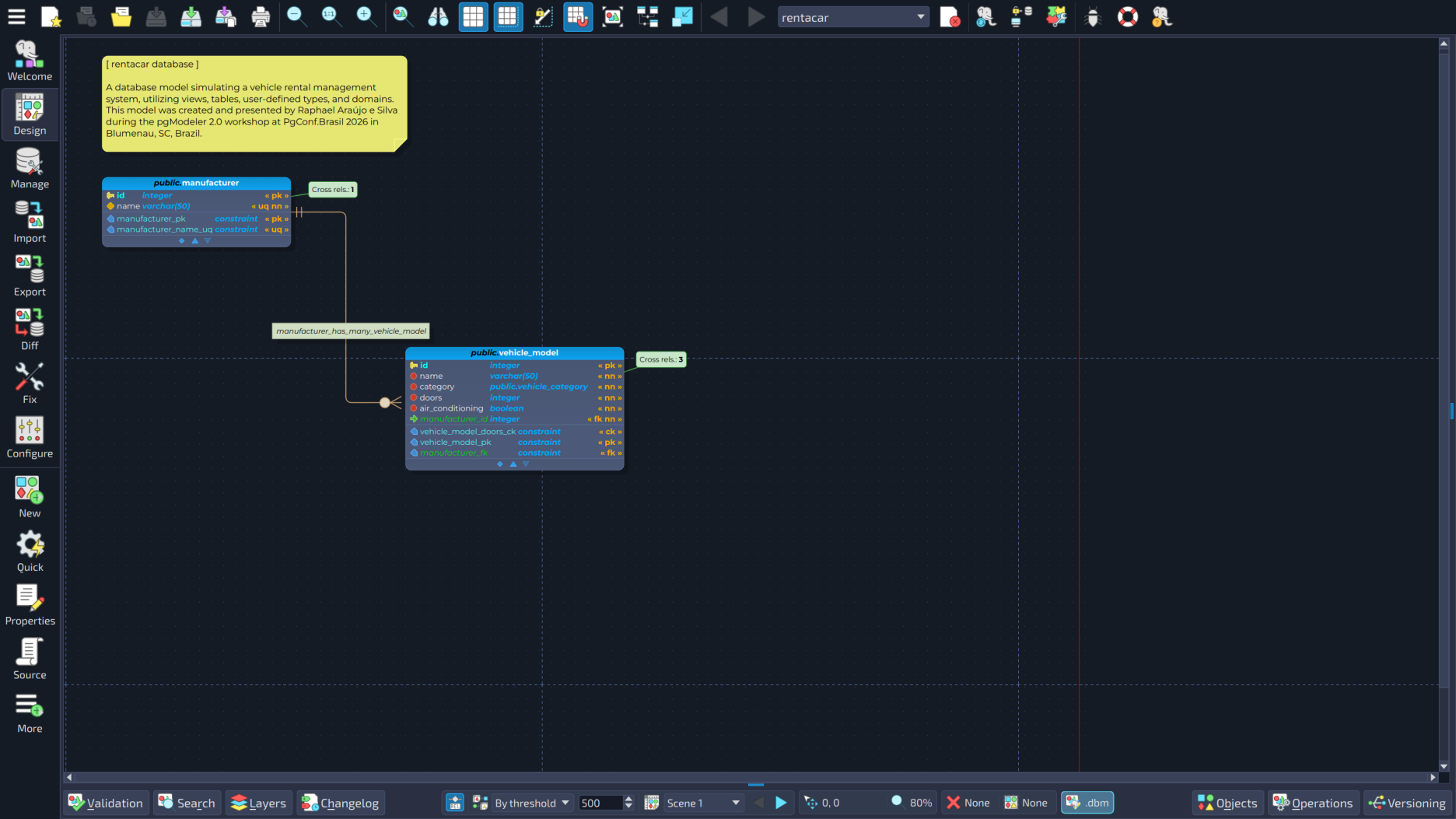
A new bar at the bottom of the design view lets you switch between scenes and change the segmentation mode and the threshold, with previous and next buttons for quick browsing. The segmentation of a model is saved along with it, including which scene was active when you closed it, so you come back exactly where you left off. Changing the mode or the threshold of an existing model takes effect when the model is saved and reloaded, and pgModeler offers to do that for you.

Relationships that cross scenes
What about relationships between tables that live in different scenes? Drawing lines that cross scenes would not make sense, so a table that relates to a table in a different scene shows a small marker with the number of cross-scene relationships, instead of a relationship line. Double-click the marker and a dialog opens, listing those relationships in a sortable grid. From there, a double-click navigates directly to the related table or to the relationship itself.
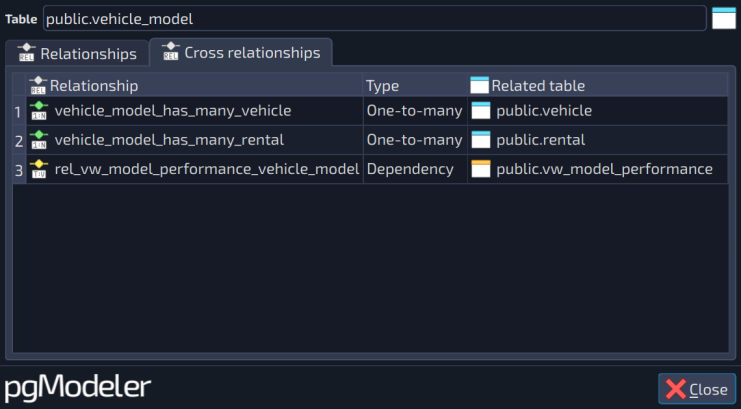
Sometimes the drawn relationships add more visual noise than value, even inside a scene. For those models, there is an option to also hide the relationships between tables of the same scene, which are then represented through the very same marker and listed in the very same dialog. Both the segmentation mode and this option can be set up front, when importing a database, in the GUI (the Segmentation and Hide relationships options of the import form) and in the command line.
Scenes everywhere
Introducing scenes meant revisiting practically every operation that used to assume a single canvas. The goal was that you never have to think about it:
- Selection, the object search widget and layers now work across every scene, or follow the scene of the clicked object, instead of assuming a single canvas.
- Rearrange objects can be applied to the active scene or to all the scenes of the segmented model.
- PNG and SVG export produce one image per scene.
- You can move tables, views, foreign tables, and text boxes to another scene manually. When the model is segmented by schema, objects stay in the scene of their schema.
- New menu actions create a tag or a layer directly from one or more selected schemas.
- When you open an existing model whose objects are concentrated in very few scenes, pgModeler offers to switch the segmentation mode for you.
- Moving a table to another schema, undoing and redoing, deleting a schema: the tables, their relationship markers and their positions follow along.
- Loading a model in progress can be cancelled, and the scene panel and the plugins dock are disabled while a model is being validated, preventing operations that the running validation would not account for.
And in the command line
pgmodeler-cli speaks scenes too. When importing a database, the new options segment the model right away, matching the reverse engineering form of the GUI:
  -se, --seg-mode [MODE]            Segments the imported model's canvas into multiple scenes.
                                    Available modes: [schema | threshold].
  -th, --seg-threshold [NUMBER]     Number of tables/views/foreign tables per scene. Only for --seg-mode threshold.
  -hr, --hide-rels                  Hides the relationships between tables of the same scene in the imported model.
The model fix (--fix-model/--fix-sdbm) preserves the segmentation data of your model (mode, threshold, the rectangle of each scene and the last active scene) instead of discarding it, and a bug that made --fix-sdbm discard almost every object of a split model saved with ID comments is gone.
Orthogonal relationship lines
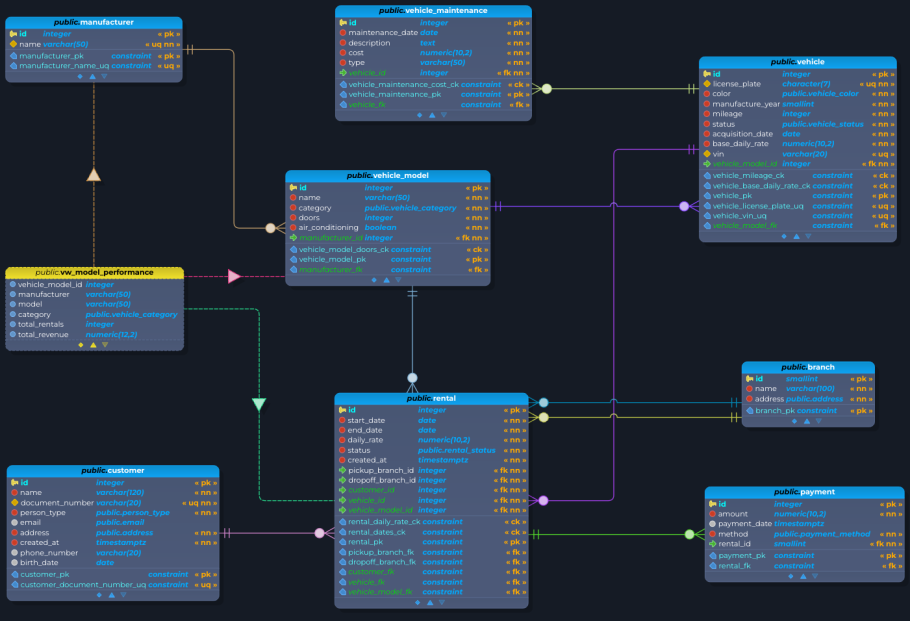
Relationships have a new look, and it is the one you see in every screenshot of this post. pgModeler can now draw them with an orthogonal line style: lines made only of horizontal and vertical segments, like the ones you find in architectural drawings and in most database diagrams made by hand. The routes are searched automatically and go around the tables and around the crow's foot areas of other relationships, so a line no longer cuts through an entity or hides the cardinality of its neighbor.
When two lines have to cross, one of them hops over the other through a small arc, and the shading of the arc tells which line is on top (darker when convex, lighter when concave), so you never wonder whether two lines are connected or just passing by. The relationship descriptor is also kept away from the corners of the route, which keeps the names readable.
And the lines are yours to adjust:
- Hold
SHIFTand drag a segment to move it sideways. The end segments, the ones attached to a table, are moved through a jog, a small corner next to the table that can be dragged as well. ALT+SHIFT+ click discards the adjustments of a line, and they are also discarded when one of the linked tables moves or is resized, so the automatic route can do its work again.- The adjustments are saved with the model and also in the objects' metadata files, so they survive reloading and can be shared with the metadata of your model.
Moving tables got lighter too: only the relationships whose routes touch the area of the moved tables are recalculated, and when several tables move together, each nearby relationship is reconfigured once.
The style is chosen in the relationships settings: straight, curved, or orthogonal, with orthogonal as the new default. It replaces the old "Use curved lines" option, so if you preferred curves, pick that style again after upgrading.
One thing to keep in mind: being the smartest of the three styles, orthogonal routing demands a bit more processing, and in scenes that are very dense in relationships, it can be slower than the other styles. My recommendation is to use it in small to medium models, up to roughly 1,000 to 2,000 relationships. For models larger than that, the curved and straight styles are the better choice.
pgModeler 2.0 starts to reveal its new visual identity
The application went through a full visual overhaul, and it started with the first alpha: the logo has been redesigned, icons now use a flatter and more colorful palette, and both the light and dark themes have been refined for greater visual consistency. The splash screen and application icons were harmonized to match the new style, and across Linux, Windows, and macOS, icons, splash screens, and pop-up menus were redesigned to provide a cleaner and more modern identity.
Under the hood, there is a brand new theming engine that renders widgets contextually across all built-in themes (light, dark, inksaver, and a custom theme option): tooltips, scrollbars, tab bars, progress bars, menus, checkboxes, radio buttons, and more. The themes system was redesigned, so now the color palette can be changed via a theme.conf file in each theme folder, and user-created themes present in the themes folder are loaded as well. The detection of the system palette is smarter, too.
The overall interface also received a significant refresh. pgModeler now ships with the Exo 2 font as the new default UI font, while model object labels now use the Montserrat font family for improved readability and visual consistency. Users can also customize the application font directly from the Appearance Settings using any font installed on their system. A refreshed color scheme makes tables, column types (PK, FK, NN, UQ), and constraints easier to tell apart at a glance.
To make the interface feel more responsive, we introduced subtle visual effects throughout the application. Input widgets, buttons, checkboxes, and radio buttons now feature custom hover effects that provide immediate feedback during interaction. We also added focus borders to checkboxes and radio buttons to clarify selection, while progress bars now display smooth busy indicator animations during long-running operations. These small touches combine to create a more polished, professional user experience.
A number of other small visual tweaks make the interface more coherent across the different available themes:
- Checked menu items that have an icon now display a highlight consistent with what already happened for toolbar buttons.
- Buttons with an attached dropdown arrow are now rendered as a single unified shape, removing an annoying double line at the seam.
- Disabled elements that use accent colors (such as warnings) keep their visual identity instead of simply turning gray.
- There is a new accent style that automatically follows the operating system's accent color, adapting to different themes.
- The buttons of the tools toolbar share the same width, and self-relationship loops get rounded corners in the curved and orthogonal line styles.
And there is a set of smaller usability improvements that make a difference during long working sessions:
- File dialogs now automatically append the correct extension when saving models or exports.
- Recent files now display their full path in tooltips, making it easier to distinguish projects with identical names.
- Settings dialogs now behave more consistently when changes are discarded or reverted.
- Visual refinements across themes and forms improve readability and reduce interface clutter.
These are subtle changes individually, but together they contribute to a much smoother experience.
Editing forms rebuilt from scratch
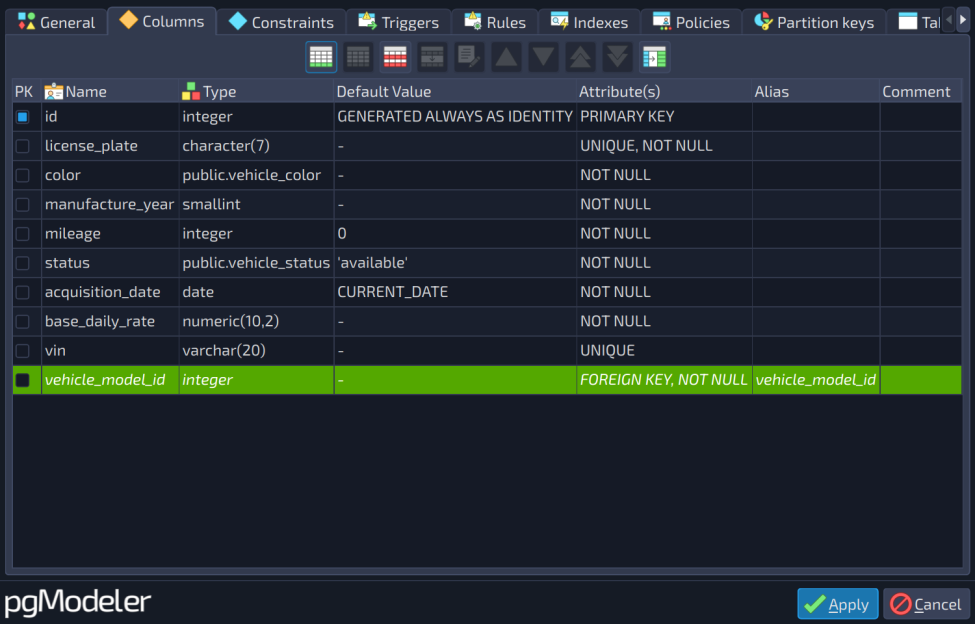
The most significant change of the alpha1 cycle was the comprehensive redesign of all object editing forms. Every single form, from simple objects like Roles and Schemas to complex ones like Tables, Relationships, and Constraints, has been modernized with a cleaner, more organized layout. We adopted a tabbed interface for complex forms, making it easier to navigate through different configuration sections. All forms now share a consistent visual language with improved label organization and intuitive control grouping, significantly reducing visual clutter and speeding up your editing workflow.
Enhanced keyboard navigation
Recognizing that many power users prefer keyboard-based workflows, this release introduced a new tab order manager system. It automatically configures the tab order for all editing forms, allowing you to navigate through fields using the Tab key in a logical, predictable manner without manual setup. The system is smart enough to skip hidden or disabled widgets and properly handles Shift+Tab for reverse navigation. This enhancement makes data entry faster and the application more accessible for keyboard-centric users.
Modernized code preview
The code preview functionality has been completely overhauled with a more capable and user-friendly widget. Replacing the old implementation, the new code preview offers superior syntax highlighting, improved filtering capabilities, and a cleaner interface. This makes reviewing generated SQL and XML code a much more pleasant task, particularly when inspecting complex database objects or troubleshooting code generation issues.
Integrated object associations viewer
Understanding the relationships between database objects is crucial for effective design. The object associations viewer has been directly integrated into the object editing forms under the new Associations tab. This integration makes it much easier to track dependencies and references in real-time while editing an object, helping you understand the full impact of changes immediately without having to leave the configuration dialog.
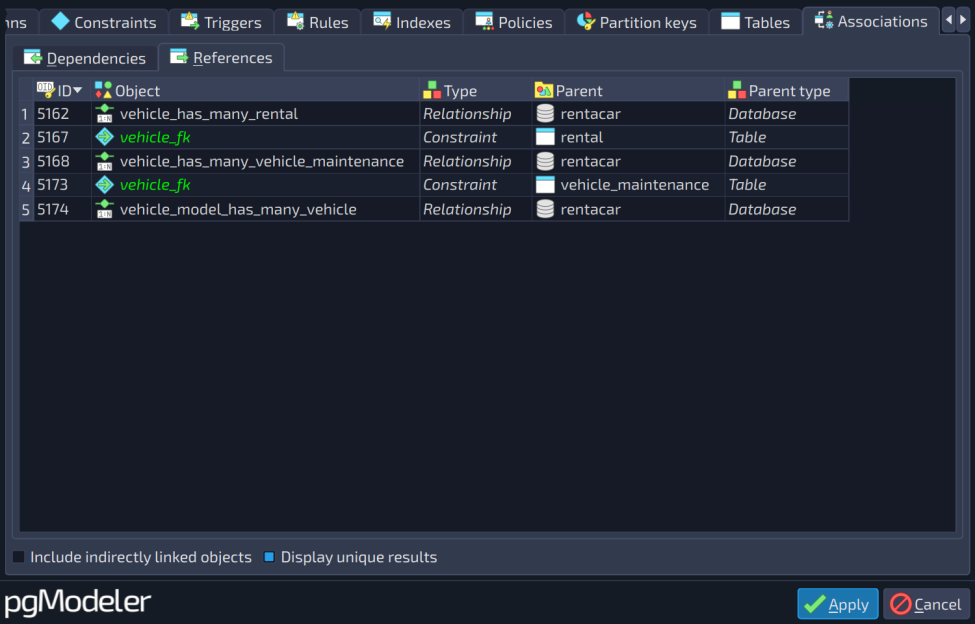
Please keep in mind that associations for an object are listed only when it has been effectively created in the database model. If an object is new and does not yet exist in the model, the associations list will remain blank until the object is committed.
Unsaved changes protection
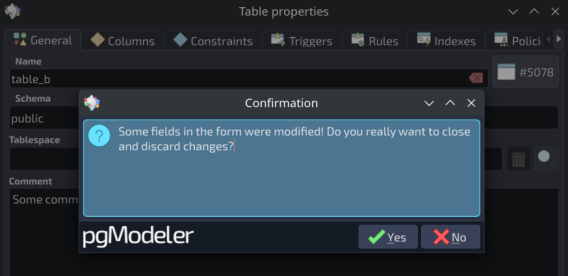
One of the key goals of this cycle was to reduce friction during daily work. A good example is the new unsaved changes protection. If you accidentally press Escape while editing an object, pgModeler now detects pending modifications and asks for confirmation before discarding your work. It is a small change on paper, but one that prevents a surprisingly common and frustrating source of lost work.
More forms, more care
- The view editing form shows the SQL preview side by side with the references editor, refreshing live as you add or remove references. The tag selector and the references panel were reorganized into a cleaner layout, and the minimum window size was reduced, making it easier to use on smaller screens.
- The Layers panel gained an option to select, directly on the canvas, all objects belonging to the currently selected layers, a real time-saver for anyone working with large models organized into layers.
- Editing a column from a relationship's attributes tab now correctly opens the column editor instead of the constraint editor, and the model objects panel no longer clears your current selection when you click elsewhere on the screen. Two small things that were a real annoyance in daily use.
- Renaming a column now also updates the views that reference it, and views use the alias of a column as its name when one is defined.
- Duplicating a table copies its children with the default name disambiguation.
- GenericSQL objects now support a comment.
- The validation system catches more potential errors, such as foreign keys with
SET NULLactions tied toNOT NULLcolumns.
Import, Diff, Export and Fix join the main window
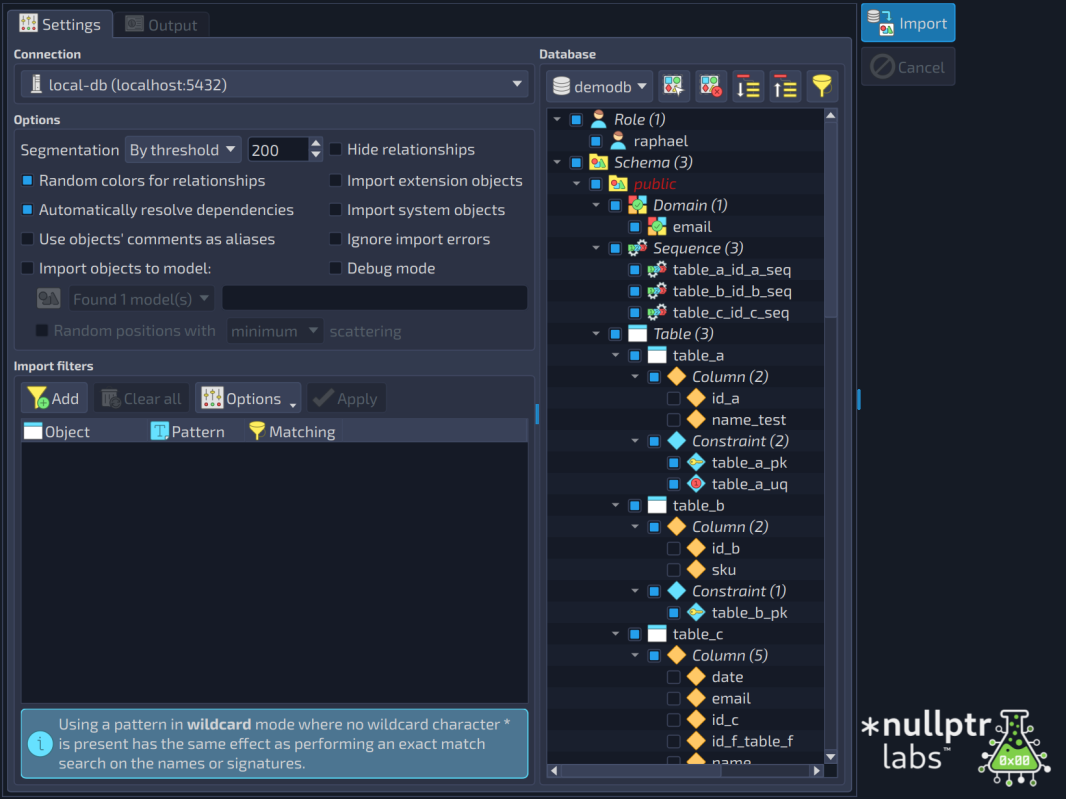
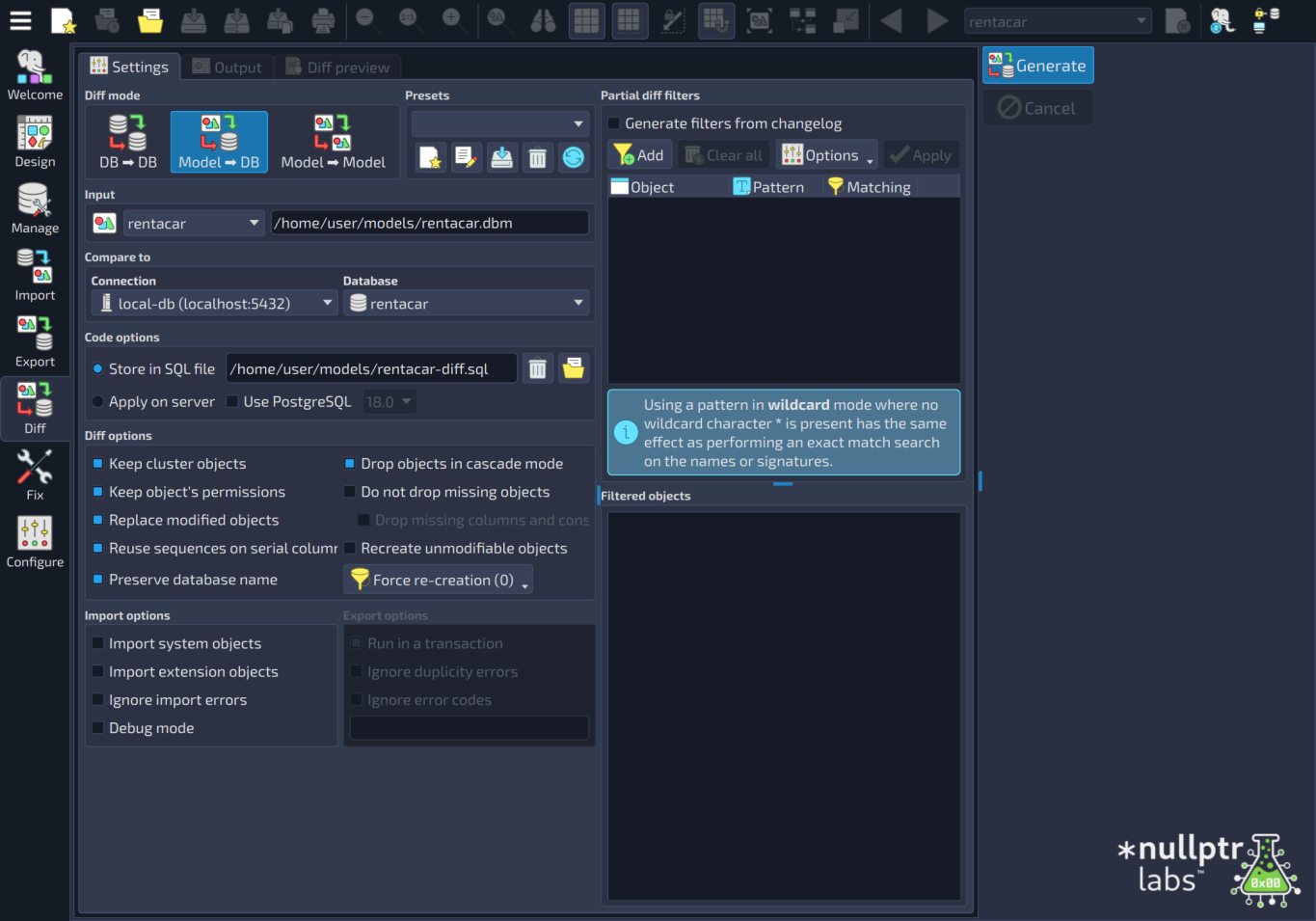
Interaction has also evolved. The configuration form, diff, import, export, and fix tools are now integrated directly into the main window, reducing the number of modal dialogs and making the workflow smoother. The model fix and metadata handling tools were merged into a single, integrated tool, and several button semantics were improved. In 2.0.0, importing a database, comparing it with a model, and exporting the result are dedicated views of the main window: the Import view, the Diff view, and the Export view, consistent with the design view you already know.
Diff tool improvements
The diff tool received significant attention. Users can now compare two loaded models without requiring a database connection, generating the corresponding SQL diff code for later use, both in the GUI and in the command line. This new mode expands the tool's usability.
Previously, when comparing a model and a database, only the active model could be used as input. That led to the development of a new model/database selector widget, allowing users to select any loaded model or database in a more intuitive component. The interface has also been reorganized: the Partial diff tab was removed and its controls integrated into the main tab, removing redundant elements and simplifying interactions.
Comparison presets have been improved with a more reliable save/load system. The diff now also covers changes in GENERATED STORED columns, and several situations where synchronization scripts could previously generate incomplete or inaccurate changes were fixed (more on that in the stability section).
Import and export tools enhancements
Following the same approach as the diff tool, the import and export tools received substantial improvements. Users can now freely choose any loaded model to perform operations, no longer limited to the active model. The model export widget was reorganized to include the new model/database selector, while mode selection buttons were replaced with more practical and consistent tool buttons. During export and import operations, the involved models are locked to prevent accidental modifications.
SQL management improvements
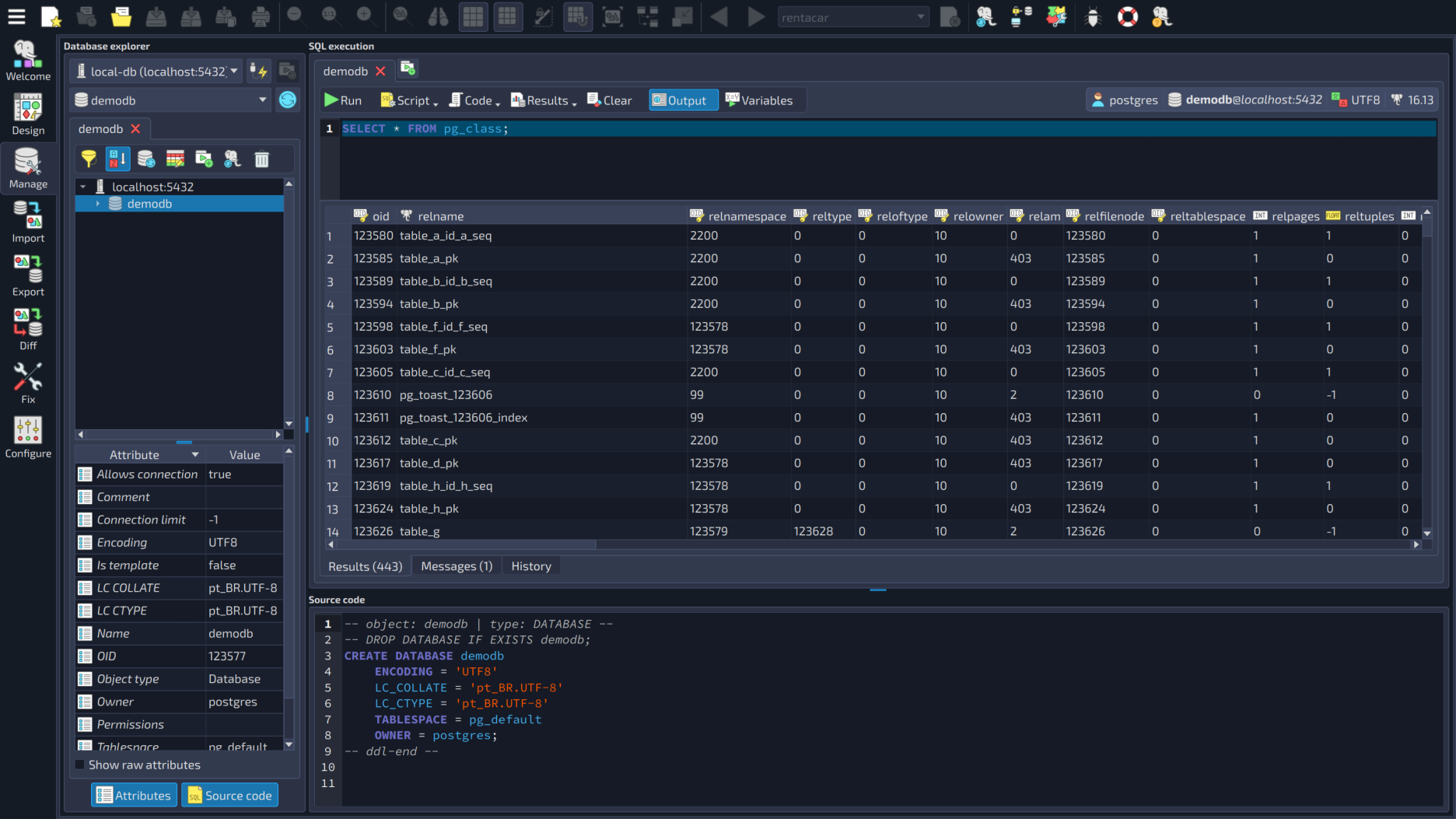
For DBAs and developers working directly with large datasets and SQL execution, this release introduces several quality-of-life improvements. Result loading operations can now be cancelled at any time, and progress indicators provide better feedback while queries are being processed.
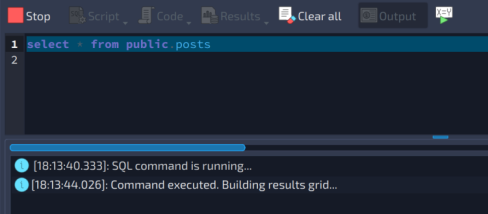
The SQL results grid also received new context menu actions for selecting all rows, auto-fitting column widths, and auto-fitting row heights. Additionally, pgModeler now warns users before attempting expensive resize operations on result sets larger than 10,000 rows, helping prevent interface freezes on massive queries.
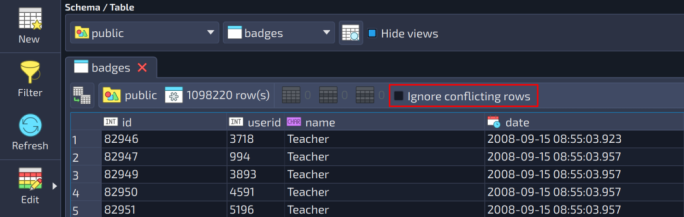
The data grid was also improved to better support bulk operations by allowing conflicting rows to be skipped silently during inserts (ON CONFLICT DO NOTHING) when desired, and it supports grid duplication via a button or Ctrl+Shift+D. pgModeler also now exposes the server character encoding directly in important management views, helping teams quickly identify incompatibilities before they become data handling issues. There is also a button to browse the selected table in the data handling form, and SQL code completion is smarter when the editor has more than one statement: it now knows which one the cursor is in, instead of using the wrong table or command context.
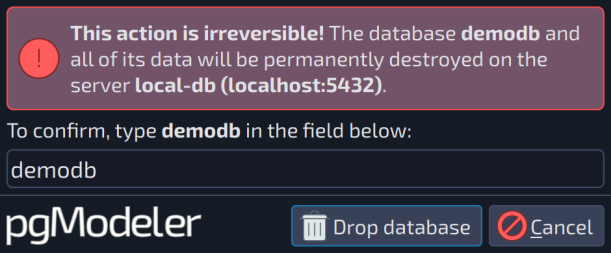
Dropping a database is now harder to do by accident. After accepting the usual warning, a Danger zone dialog asks you to type the name of the database, and the DROP DATABASE is only executed when the typed text matches exactly. It applies to the drop actions of both the database explorer's toolbar and the database list.
PostgreSQL 18 and temporal keys
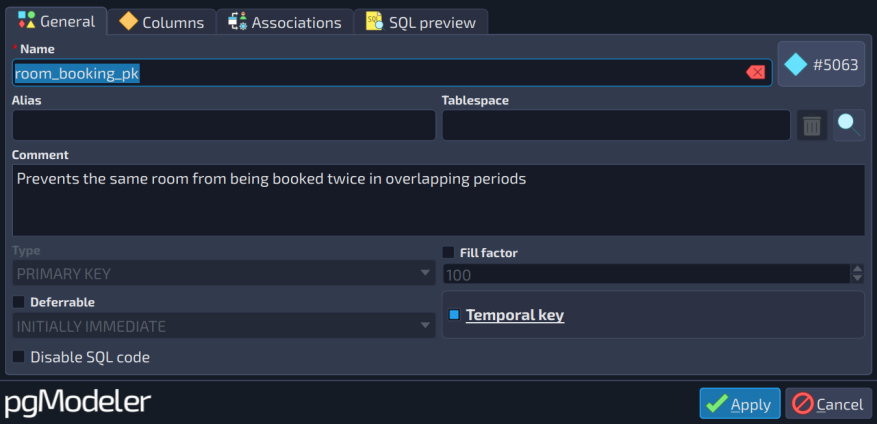
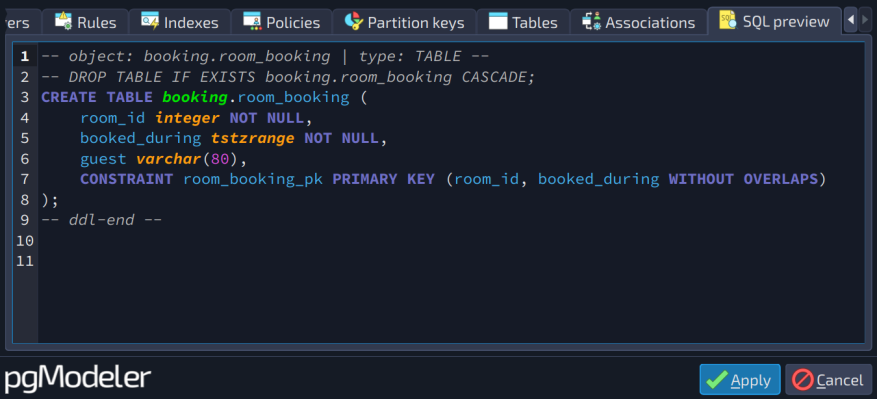
pgModeler 2.0.0 brings support for PostgreSQL 18, and, with it, the temporal keys introduced in that version. Primary and unique keys can be defined with the WITHOUT OVERLAPS clause, and foreign keys can reference them using PERIOD, letting you properly model time-bound data, such as validity periods or scheduling ranges, instead of relying on ad-hoc check constraints. A new "Temporal key" option is available wherever these constraints are configured.
pgModeler speaks your language
This is one that I am particularly happy about. The user interface can now be fully translated, and 2.0.0 ships with 34 translations, chosen to best represent pgModeler's current audience, based on usage statistics: Bulgarian, Chinese (simplified and traditional), Croatian, Czech, Danish, Dutch, Finnish, French, German, Greek, Hungarian, Indonesian, Italian, Japanese, Korean, Latvian, Malay, Norwegian Bokmål, Polish, Portuguese (Brazilian Portuguese and European Portuguese), Romanian, Russian, Serbian (Cyrillic and Latin), Slovak, Slovenian, Spanish, Swedish, Thai, Turkish, Ukrainian and Vietnamese.
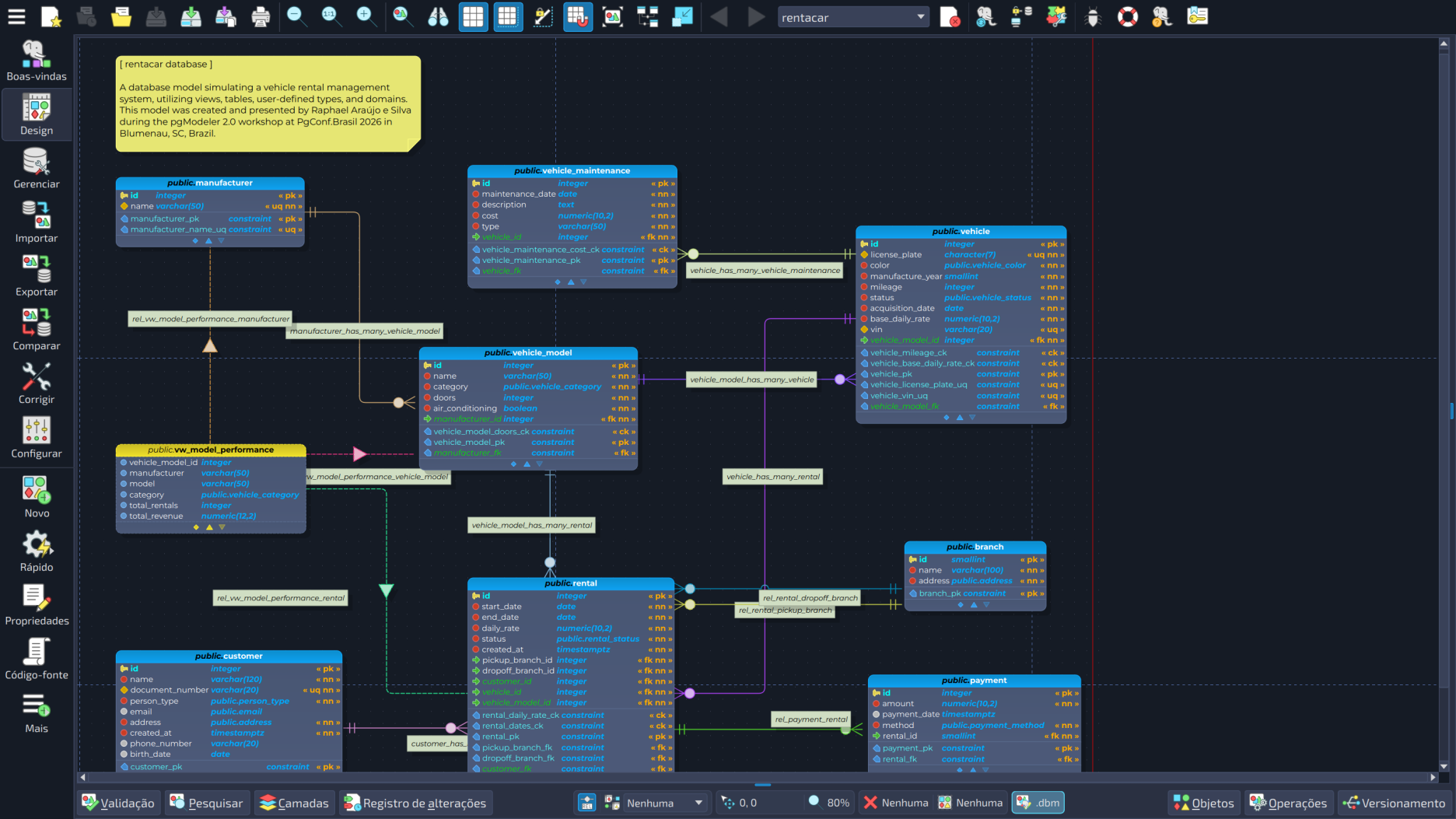
You choose the language in the General settings. The original English texts are always one choice away (English US), a language with a region that has no dictionary of its own (such as Spanish from Mexico) falls back to the generic one (Spanish), and every executable of pgModeler, not only the main application, follows the configured language. The texts of the plugins are translated as well.
An honest note: all of these translations were generated with AI assistance, and the human review of their accuracy is still pending. The language selector says so in its tooltip. If you speak one of these languages and would like to help, collaborations are very welcome, and the project now has a CMake target that regenerates the translation sources from the code, so the door is open. More languages will be added as our audience grows.
Faster. Much faster.
Several bottlenecks that mattered the most on large, real-world models were addressed in 2.0.0. The internal template engine behind every bit of generated SQL and XML was substantially reworked: parsing a schema file now takes roughly a third of the CPU instructions it used to. Together, SQL and XML generation on real-world models is 50-70% faster, which also speeds up opening and saving large models. Here is where the time went:
- The schema files are no longer re-read and reprocessed every time they are used: the already-processed content (comments stripped, includes resolved) is cached.
- Regular expressions that used to be rebuilt on every call (name validation, XML entity conversion and several fixed patterns across objects, types and functions) are gone or built just once.
- The attribute map is no longer copied for every object that is generated, and the internal dispatch of the interpreter (metacharacters, comparison operators and conditional branches) was simplified.
- Objects are looked up by name and signature through an index, instead of a linear scan.
- Applying changes through the database editing form no longer causes a multi-second stall on large models, because only the
CREATE DATABASEcode is validated instead of the code of the whole model. - Large model loads do less redundant layer and scene refresh work.
The canvas got its share of attention, too. Panning, zooming, dragging and selecting stay smooth, including on large or densely connected models:
- Antialiasing is dropped while the scene is being panned, zoomed, or dragged, and when relationship curves are painted at low zoom.
- The redraw of relationships is debounced during batched updates of tables and models.
- The background grid and the page delimiters are rendered only in the exposed area.
- The click detection of relationship curves is computed lazily, and a needless re-render cascade when propagating protected state was removed.
Stability and diagnostics
Stability and reliability were major priorities during this cycle. A considerable amount of work was dedicated not only to fixing crashes and edge cases, but also to improving how pgModeler behaves under complex real-world scenarios involving large models, extension-heavy databases, imports, synchronization operations, and multi-platform usage. Overall, the cycle focused heavily on reducing friction, improving predictability, and making pgModeler more resilient for professional environments where stability matters as much as features.
The command-line interface now generates detailed diagnostic reports whenever unexpected failures occur. These reports provide significantly better visibility into problems and greatly simplify troubleshooting and support workflows. Several important stability improvements were implemented across the platform, including fixes for:
- Crashes that could occur after synchronization operations and when closing the application after a diff.
- Crashes in model validation when a column was restored through undo, and in the closing and reloading of models.
- Issues when creating tables containing indexes during editing.
- Instability while exporting models as PNG images through the CLI, and crashes in the model export widget.
- Application freezes caused by font rendering loops.
- Crashes triggered by empty query results in SQL management views, and when editing connections while browsing databases.
- Problems affecting navigation history and recent models tracking.
- Incorrect handling of database connections after discarding settings changes.
- Interface inconsistencies on macOS and Windows when using custom fonts.
- An intermittent crash when SQL or XML was generated from more than one thread at the same time (export, validation, import, and diff all do it).
- Data corruption when closing or reloading models that used certain user-defined types.
- Hangs and errors in the schema parser, reachable by typing a malformed snippet in the Snippets tool.
- Two crashes when moving segments of orthogonal lines, one of them caused by a corrupted segment index in a model file.
- The Versioning plugin announcing a successful synchronization after a failed pull or push, for instance when the credentials dialog was canceled or on a merge conflict. The push is now skipped unless the pull succeeds.
A big batch of memory leaks was closed as well. Memory that used to creep up during longer editing sessions, especially when working with relationships, the undo/redo history, copy-and-paste operations, or several open models at once, is now much better under control. That includes a model that was not freed when its tab was closed, a use-after-free when pasting or duplicating table objects, and leaks in the result sets of failed commands and in the busy progress bar animation.
Database modeling and synchronization reliability also received important improvements. This cycle fixes multiple situations where synchronization scripts could previously generate incomplete or inaccurate changes, including:
- Column precision and length modifications not being detected correctly.
- Inherited constraints generating false-positive changes.
- Malformed synchronization commands involving partitioned tables or extensions.
- Duplicate permissions being generated during reverse engineering.
- An empty
SET EXPRESSION AS ()being generated for columns that are not generated. - Import inconsistencies involving PostgreSQL extensions, collations, operators, foreign tables, and custom types.
Compatibility with LATIN1-encoded databases was improved through internal infrastructure changes, resolving problems previously reported during import and synchronization operations. A model validation that skipped types owned by extensions, collations saved as deterministic even when the option was unchecked, columns that belong to primary keys that could not be removed, and the value overflow when aligning points to the grid in the design view were fixed, too. Exporting images to PNG or SVG now happens as a single, direct step instead of running in the background. This works around a limitation in the underlying graphics engine and makes this type of export more reliable.
The command line
pgmodeler-cli received several key upgrades. The help menu now features automatic line wrapping with sentence-based breaks, making it much easier to read on narrow terminals. There is also support for version-only printing, which is particularly useful for integration with deployment pipelines and automation scripts:
$> ./pgmodeler-cli --version
pgmodeler-cli 2.0.0 <build>
Command-line users were also taken care of in the way object comments are handled when generating SQL. The option --no-escape-comments, which started as a community pull request, disables the E'' escape-string syntax on COMMENT ON statements during export, so all comments are written in the common string syntax:
# General options:
  -if, --input [FILE]               Input model file (.dbm). Required for export and model fix operations.
  -id, --input-db [DBNAME]          Input database name. Required for import operation.
  -of, --output [FILE|DIRECTORY]    Output file or directory. Required for model fix or export to SQL, HTML, PNG, SVG.
  -pv, --pgsql-ver                  Forces PostgreSQL syntax to the specified version when generating SQL code.
                                    Version format: [major].[minor], e.g., 18.0.
  -ne, --no-escape-comments         Disables E'' escape-string syntax on COMMENT ON statements during export.
                                    All comments are written in the common string syntax.
  -s, --silent                      Silent execution. Only critical messages and errors are displayed.
Together with the diff of two models and the new segmentation options, the CLI is more capable than ever.
Experimental: case-insensitive object names
pgModeler 2.0 introduces experimental support for disabling name quoting, allowing pgModeler to treat object names as case-insensitive. This feature addresses a long-standing request from users who prefer to work with unquoted identifiers. While still experimental, it represents significant progress toward supporting a wider variety of naming conventions and workflows. The option that controls this new feature is found in General settings, checkbox Disable automatic name quoting.
Important: this option is potentially dangerous if enabled for models created in previous versions of pgModeler. Using it on older models may lead to a breakdown of the model structure. If this occurs, it will be necessary to apply a correction process via pgmodeler-cli --fix-model to restore the model's integrity.
Miscellaneous improvements
Other notable changes along the way, in addition to the full list that you can find in the file CHANGELOG.md:
- Hiding empty object groups in database object trees (in the database explorer and in the import view). The hidden status is persisted in the
general.conffile. - A button in the model fix tool to generate the output filename based on the input filename.
- The result set handling was refactored, minimizing the risk of memory leaks.
- Improved English grammar in the internationalization strings across the UI.
- Missing SQL keywords were added to
sql-highlight.conf. - A bug in the connection configuration that was creating an invalid connection string when other parameters were manually specified was fixed.
- Collations assigned to columns are now reflected in the SQL and XML codes.
- The PostgreSQL version detection now uses the default internal server version as a fallback when a major server version is not yet recognized by the tool.
- A bug in the XML parsing that was not configuring the DTD file path correctly, causing errors during the loading of some configuration files on Windows, was fixed.
- A value written without escaping in the default values of columns in the HTML data dictionary was fixed.
- The progress dialog of long tasks can now be dragged by a handle.
- The customization of a foreign key relationship (alias, layers, points, label positions, displaced segments, color, faded out and protected states) is no longer lost when the relationship is recreated at the end of a model loading.
- The context menu no longer opens when right-clicking a relationship marker, and the object overlay widget is no longer shown empty when two tables are selected.
For plugin developers
Plugin developers now have greater flexibility when integrating custom tools into pgModeler. Custom plugins are now capable of docking panels in different application areas, integrating directly with the welcome screen, and operating without visible docked components entirely. These changes open the door for more advanced integrations and workflow extensions, and the biggest example of this new extensibility is the Git plugin you are about to see.
The way pgModeler communicates internally with plugins has been improved too, making it easier and more reliable to build extensions that react to actions like a model being loaded, reloaded, or closed. New capabilities were also added for building custom tables inside plugins. Anyone developing extensions for pgModeler will notice these improvements directly; for the full technical details, the complete changelog, the project's commit history, and the code documentation (generated using doxygen) are the best places to look.
On the build side, the migration from qmake to CMake, one of the most significant transformations of the alpha cycle, is complete. Since its early days, pgModeler has relied on qmake, but its limitations required various workarounds to ensure compilation across different platforms, which made build scripts complex and difficult to maintain. With CMake, the process becomes cleaner, standardized, and better prepared for the future growth of pgModeler. This change breaks compatibility with qmake, meaning the project can now only be compiled using CMake, and the minimum required Qt version is now 6.6.
A manual for every level of expertise
A tool is only as good as the way you learn it, and the documentation was one of the things I wanted most to fix. So, together with the application, the user manual was completely revisited and rewritten for 2.0.0, with one goal: to be useful from your very first model to the day you start bending pgModeler to your will.
It starts gently. The Preface, the Installation page, and a Getting started guide get you going, and the first chapters walk you through the main window and the basics of modeling. If you are new to pgModeler, or to modeling itself, that is the place to start. Then it goes deeper, chapter by chapter:
- Database objects: a complete tour of every object you can create, with all the fields of every editing form explained.
- Settings: each section of the settings, so you can make the tool yours.
- Export, import, and diff: the integrated views, step by step.
- Advanced tools: model overview, validation, search, layers, the SQL tool, and more.
- Advanced tips and tricks: the shortcuts and little secrets that power users love, from selecting multiple objects at once to arranging, aligning, and converting relationships.
- Plug-ins and UI translations: how the plugins work and how to help translate the interface.
And for everyone, from the first-timer to the expert, there are five appendices: the schema microlanguage that generates all the SQL and XML code (the one that is now so much faster), a complete list of shortcuts, pgModeler's anatomy, a look at the subprojects, libraries and executables that make the whole application tick, a FAQ and troubleshooting guide for when something does not go as expected, and a glossary to make the vocabulary of PostgreSQL and of the tool friendlier to newcomers.
What I am proudest of, though, is how it was made. The screenshots and the tables of fields are not typed or cropped by hand: they are generated from the application itself. A small tool instantiates the real dialogs and windows of pgModeler, with the same themes and fonts you see, captures hundreds of screenshots with numbered callouts over the fields, and extracts the description of every field straight from the tooltips of the application. When the interface changes, the manual is regenerated, so what you read is what you get. No more screenshots from three versions ago.
You can also read the manual of previous versions: a version selector takes you from 2.0.0 back to the 0.9.x series, in case you are still on an older release. Everything is searchable, and the images open in a viewer when you click them. The new manual is at pgmodeler.io/docs, and I would love to hear what is missing, what is unclear, and what could be better. Documentation is never really finished, and your feedback will shape it.
Two editions: Community and Plus

pgModeler 2.0.0 marks an important structural milestone for the project with the formal introduction of the new edition model. Starting with the 2.0 series, pgModeler is clearly organized into two distinct editions: pgModeler Community and pgModeler Plus, built on the same core platform. The previous legacy demo mode has been completely removed from the codebase. This means the Community Edition is distributed as a clean and unrestricted open-source experience within the scope of its intended feature set, without hidden limitations or artificial restrictions.
The Community Edition remains fully open source and continues to serve as the foundation of the entire platform. It focuses on PostgreSQL schema design, visual modeling, SQL generation, the model fix and metadata tools, and educational or development workflows, plus everything described above unless stated otherwise. Most importantly, it continues to receive active maintenance, PostgreSQL compatibility updates, bug fixes, usability improvements, and ongoing evolution.
The Plus Edition expands the platform with advanced database lifecycle management capabilities designed for professional environments. In addition to everything in Community, it includes the database import (reverse engineering), model diff and synchronization, the SQL execution tool, data handling, and the database explorer, which shipped with every build up to 1.2.3 and are now Plus-exclusive, plus the versioning and SSH tunnel plugins you are about to read about.
This separation allows the project to establish a more sustainable long-term development model while ensuring that the Community Edition remains healthy, modern, and continuously evolving. For teams and companies using pgModeler in production environments, this new structure also creates a clearer distinction between open-source modeling workflows and advanced operational tooling. Most importantly, both editions continue sharing the same core platform and architecture, meaning improvements made to the foundation of pgModeler continue benefiting the ecosystem as a whole.
pgModeler Plus is more accessible to students
Plus also becomes more accessible to a new audience: university students. A 50% discount is available to students who want to use the extra features of the commercial version, including the Git plugin covered below. To request the discount, students just need to fill out this form with a valid institutional e-mail address from an accredited educational institution (personal or disposable e-mail addresses won't work). The discount applies to a fixed license configuration, with 1 seat, 1 platform, and a 6-month term, and each discount code can be used only once. If a code goes unused, a new one can't be requested until the previous one has actually been redeemed, and once a code has been used, a new one only becomes available again 6 months later.
It is a small step, but one that matters: it opens the door for students to get hands-on with the same professional tooling used by teams in production, at a price that fits a student budget.
The big highlight: full Git support built into pgModeler Plus
And now for the most important part of the Plus edition. Version control inside pgModeler wasn't entirely new territory: the tool already had a simple internal changelog that tracked changes to model objects. However, that changelog was disabled by default and only meant to be used as a reference point for partial diffs, not as real version control. If you wanted to actually version your database model with Git, you had no choice but to leave pgModeler and use the operating system's terminal, typing commands by hand. It worked, but it meant stepping outside your workflow, switching tools, and remembering the right commands at the right time.
With 2.0.0, that changed completely. The pgModeler Plus versioning plugin, something entirely new for the project, with nothing comparable existing in the tool before, evolved from a basic history viewer into a full Git client embedded right inside pgModeler. In practice, it's as if pgModeler gained its own "GitHub Desktop" or "GitKraken", built specifically for people who work with database modeling.
Here's everything you can now do without ever leaving pgModeler:
- Clone remote repositories. You can download an entire Git repository straight from the plugin's interface, with live progress as data transfers. The process supports both username-and-password authentication and SSH keys, and can automatically open the models found in the cloned repository as soon as the download finishes.
- Manage remote connections. Adding, editing, and removing remote repository addresses is centralized in the plugin's settings, including support for multiple push destinations on the same remote. SSH keys you provide are stored and automatically reused for future operations.
- Organize exactly what goes into each commit. A dedicated panel lets you choose exactly which changes will be part of your next commit, file by file, with filters to make things easier to find and a side-by-side view that shows exactly what changed before you commit. Models split across multiple files are fully supported as well.
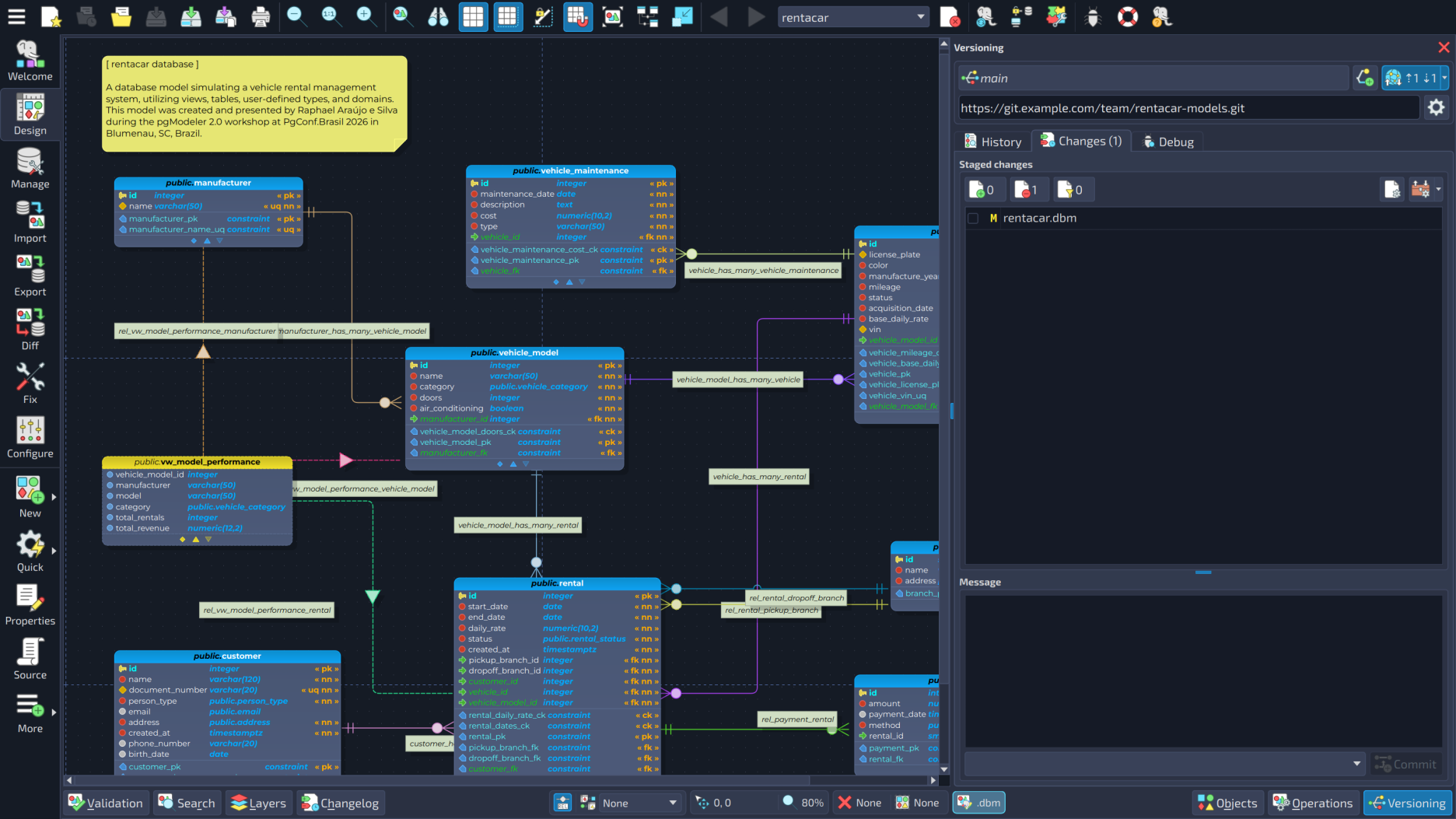
- Push, pull, and sync changes. Push and pull actions are available directly on the toolbar, with a combined sync action for convenience. The strategy used when pulling changes (merge, rebase, or fast-forward only) can be configured to match your team's preference, and the branch indicator clearly shows whether there are pending changes to push or pull.
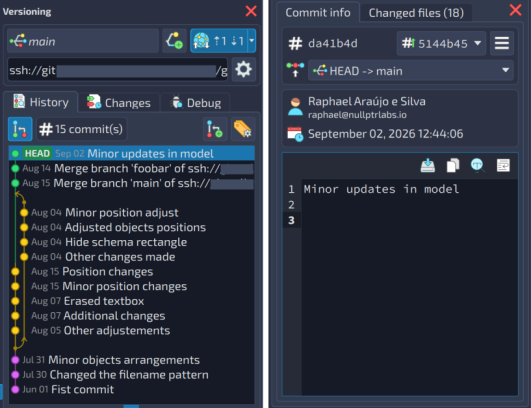
- Resolve conflicts with guidance. When a merge or pull results in conflicts, the plugin switches into a dedicated conflict mode that locks out potentially risky actions until everything is resolved. You can inspect each conflicting file, choose which version to keep or edit the result directly, and then finalize or cancel the operation safely.
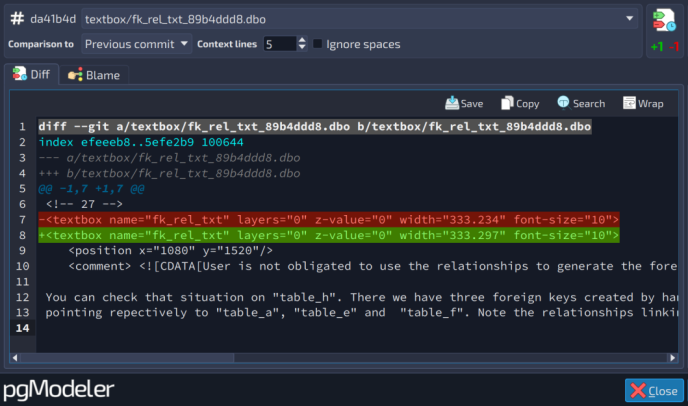
- Merge branches. The branch manager lets you merge any branch into the current one, clearly showing the source and target before you confirm the operation.
- Fast, one-click commit operations. A whole set of commit-level actions is just a click away from the history view: bring a specific commit over to the current branch (cherry-pick), even if it's a merge commit, with the plugin automatically handling the technical details for each case; fix the last commit directly (amend), correcting its message or adding a forgotten file without creating a new history entry; roll the repository back to any previous commit, with the different Git reset modes available (soft, mixed, or hard) depending on how much you want to discard; or undo a specific commit without rewriting history, by creating a new commit that reverses its changes, which is a safer way to reverse something that's already been shared with the team.
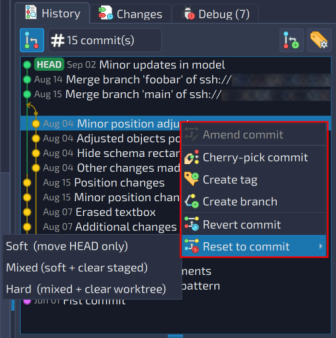
- Manage tags. A dedicated tag manager lets you create, remove, and sync tags, including annotated tags, with the option to push them to the remote repository or fetch the ones that already exist there.
- Inspect a file's history in detail. A dedicated window lets you compare a file's changes between any two commits, as well as view its blame, seeing exactly which commit introduced each line of the file. It's a handy way to understand how a specific part of a model evolved over time, or to figure out when and why a particular change was made.
- Stash work in progress. Uncommitted changes can be temporarily set aside at any time, with a list showing the date and a preview of the differences for each stashed entry. Each entry can be applied, removed after being applied, or simply discarded, and you can also clear everything at once.
- SSH authentication without repeated password prompts. The plugin automatically integrates with the system's SSH agent, so keys already loaded there are recognized without requiring the password to be typed again for every operation.
- Support for the Git credential manager. Setting up the credential manager for authentication on HTTPS remotes is also simpler, all from within the plugin's settings.
- Credentials kept out of sight. The user and password (or access token) embedded in an HTTPS remote URL are masked in the plugin's log, in its error and warning messages, and in the remote URL it shows. Keep in mind that Git itself still stores them in plain text in the repository's
.git/config.
Put all of these together, and the scale of the leap becomes clear: what used to be a basic history feature has become a complete Git workflow, built for teams and individual developers alike who want to keep their database models under version control without ever leaving pgModeler. If you model databases as part of a team, or even on your own but like keeping an organized history of your changes, this is the moment to see how built-in Git changes the workflow.
SSH tunnels with finer control
The SSH tunnel plugin has been reworked to give you more granular control over your tunnels. Automatic startup on launch is now configured per tunnel instead of being a single all-or-nothing switch, so you can choose exactly which connections should come up automatically when pgModeler starts. The toolbar button now shows a dedicated icon reflecting whether any tunnels are currently running, with a tooltip summarizing how many are active and how many are stopped at a glance. The tunnels menu was also redesigned to list every configured tunnel individually, so each one can be started or stopped on its own, in addition to the existing options to start or stop all of them at once. A bug that could cause the shutdown of a running tunnel to be silently skipped was also fixed.
Your passwords are no longer plain text
The passwords of database connections and SSH tunnels used to be saved as plain text in connections.conf and sshtunnel.conf. Now they are saved encrypted, and both files become readable only by their owner. This keeps the passwords from being read by simply opening the files, for example by another user of the same machine or in a copy of the file you sent to someone. Be aware that it is not meant to withstand someone who already controls your account. Existing passwords keep working and are converted the next time the settings are saved.
Before you upgrade
A few things deserve your attention:
- Foreign key naming changed. This is a change that breaks compatibility with the previous behavior, so it deserves special attention. The automatic naming pattern for foreign key columns has been flipped, now placing the table name before the column name (
{st}_{sc}instead of{sc}_{st}). In practice, columns that used to follow a "column_table" pattern now follow a "table_column" pattern, and the same change applies to the pattern used for many-to-many relationships. If you have models that rely on the old defaults, it's worth reviewing your relationship settings (relationships.conf) after upgrading, to make sure everything is still named the way you expect. - Relationship lines. The "Use curved lines" option no longer exists and the default line style is now orthogonal. If you prefer the old look, choose curved (or straight) in the relationships settings.
- Encrypted passwords. Older pgModeler versions can't read the encrypted passwords, so after a downgrade you will have to type them again. The configuration folder of the previous version (
pgmodeler-1.2) still holds your old passwords in plain text, so remove it if that is a concern. - Plus-only tools. Import, diff, the SQL tool, data handling and the database explorer, which were in every build up to 1.2.3, are now part of pgModeler Plus.
- Your settings. pgModeler 2.0 introduces configuration changes that may affect compatibility with 1.x settings. On the first launch, pgModeler automatically attempts to migrate your existing settings. As always, it is recommended to back up your models and databases before moving to a new major version.
- Building from source? Only CMake is supported now, and Qt 6.6 or newer is required.
- Plugin developers: several widgets and classes were renamed or moved because of the Community/Plus split and the visual redesign. Check
CHANGELOG.md.
What comes next
With 2.0.0 out, it is time to listen. I will not open the work on 2.1 this year: I will use the rest of 2026 to take care of your bug reports and to make small improvements in the 2.0.x series, collecting feedback from the community and fixing whatever turns up. Remember the roadmap I shared back in alpha1, with native Git integration inside pgModeler? It is done, and it is better than I imagined.
The development of 2.1.x will begin in early 2027, with AI integration in mind. Nothing is planned yet: during the rest of this year, I will be studying the possibilities of how artificial intelligence can really help in the daily work of modeling databases. What it becomes will depend a lot on what you tell me, so tell me.
If you find a bug, please open an issue, and I will look at it as quickly as I can. If you like the work being done to create a quality database design tool, please consider becoming a sponsor of the project on GitHub, try Plus, tell your colleagues, and help with translations if you can. Any open-source project needs financial support to keep the development alive, and pgModeler is no different. The installation instructions and the new user manual are in the documentation.
To everyone who tested the alphas and betas, reported bugs, sent feedback, translated, sponsored, and simply kept using pgModeler all these years: thank you. This release belongs to all of you.
The journey toward pgModeler 2.0 is over, and a new one begins. See you! ;)
Add new comment