pgModeler 2.0.0-beta1 is a natural evolution of the beta release, bringing important stability fixes, a series of usability improvements to the interface, and, most notably, a huge leap forward for the versioning plugin in pgModeler Plus. That plugin is, in fact, the star of this release — and we'll dive into it in detail below.
More stability for everyday use
A significant part of the effort behind this release went into making pgModeler more solid and reliable. Several crashes that could occur in specific situations have been fixed, such as one that happened during model validation after undoing the removal of a column, and another related to closing and reloading a model. A number of issues that caused memory usage to creep up during longer editing sessions were also resolved — especially when working with relationships, the undo/redo history, copy-and-paste operations, or several open models at once.
Another practical change: exporting images to PNG or SVG now happens as a single, direct step instead of running in the background as before. This works around a limitation in the underlying graphics engine and makes this type of export more reliable.
In total, this release bundles more than a dozen small fixes across editing forms, exporting, SQL auto-completion, and the debug output panel. Two of them are worth calling out because they were a real annoyance in daily use: the model objects panel no longer clears your current selection when you click elsewhere on the screen, and editing a column from a relationship's attributes tab now correctly opens the column editor instead of the constraint editor.
Heads up: a change to the foreign key naming convention
This is a change that breaks compatibility with the previous behavior, so it deserves special attention. The automatic naming pattern for foreign key columns has been flipped, now placing the table name before the column name. In practice, columns that used to follow a "column_table" pattern now follow a "table_column" pattern — and the same change applies to the pattern used for many-to-many relationships.
If you have models that rely on the old defaults, it's worth reviewing your relationship settings after upgrading, to make sure everything is still named the way you expect.
Temporal keys support
pgModeler now supports the temporal keys introduced in PostgreSQL 18. Primary and unique keys can be defined with the WITHOUT OVERLAPS clause, and foreign keys can reference them using PERIOD, letting you properly model time-bound data — such as validity periods or scheduling ranges — instead of relying on ad-hoc check constraints. A new "Temporal key" option is available wherever these constraints are configured.
A refreshed view editing form
The view editing form now shows the SQL preview in its own dedicated tab, which is only generated when you actually open it — keeping the editing experience lighter. The tag selector and the references panel have also been reorganized into a cleaner layout, and the minimum window size was reduced, making it easier to use on smaller screens.
Improved layers management
The Layers panel gained an option to select, directly on the canvas, all objects belonging to the currently selected layers — a real time-saver for anyone working with large models organized into layers.
New command line option
Command-line users were also taken care of: it's now possible to control more precisely how object comments are handled when generating SQL using the option --no-escape-comments.
...
# General options:
  -if, --input [FILE]               Input model file (.dbm). Required for export and model fix operations.
  -id, --input-db [DBNAME]          Input database name. Required for import operation.
  -of, --output [FILE|DIRECTORY]    Output file or directory. Required for model fix or export to SQL, HTML, PNG, SVG.
  -pv, --pgsql-ver                  Forces PostgreSQL syntax to the specified version when generating SQL code. ↲
                                    Version format: [major].[minor], e.g., 18.0.
  -ne, --no-escape-comments         Disables E'' escape-string syntax on COMMENT ON statements during export. ↲
                                    All comments are written in the common string syntax.
  -s, --silent                      Silent execution. Only critical messages and errors are displayed.
...
A more consistent look
A number of small visual tweaks make the interface more coherent across the different available themes: checked menu items that have an icon now display a highlight consistent with what already happened for toolbar buttons; buttons with an attached dropdown arrow are now rendered as a single unified shape, removing an annoying double line at the seam; disabled elements that use accent colors (such as warnings) keep their visual identity instead of simply turning gray; and there's a new accent style that automatically follows the operating system's accent color, adapting to different themes.
Better tools for plugin developers
The way pgModeler communicates internally with plugins has been improved in this release, making it easier and more reliable to build extensions that react to actions like a model being loaded or closed. New capabilities were also added for building custom tables inside plugins. Anyone developing extensions for pgModeler will notice these improvements directly; for the full technical details, the complete changelog, the project's commit history, and the code documentation (generated using doxygen) are the best places to look.
Redesigned SSH tunnel plugin
The SSH tunnel plugin has been reworked to give you more granular control over your tunnels. Automatic startup on launch is now configured per tunnel instead of being a single all-or-nothing switch, so you can choose exactly which connections should come up automatically when pgModeler starts. The toolbar button now shows a dedicated icon reflecting whether any tunnels are currently running, with a tooltip summarizing how many are active and how many are stopped at a glance. The tunnels menu was also redesigned to list every configured tunnel individually, so each one can be started or stopped on its own, in addition to the existing options to start or stop all of them at once. A bug that could cause the shutdown of a running tunnel to be silently skipped was also fixed.
The big highlight: full Git support built into pgModeler Plus
And now for the most important part of this release. Version control inside pgModeler wasn't entirely new territory — the tool already had a simple internal changelog that tracked changes to model objects. However, that changelog was disabled by default and only meant to be used as a reference point for partial diffs, not as real version control. If you wanted to actually version your database model with Git, you had no choice but to leave pgModeler and use the operating system's terminal, typing commands by hand. It worked, but it meant stepping outside your workflow, switching tools, and remembering the right commands at the right time.
With 2.0.0-beta1, that changes completely. The pgModeler Plus versioning plugin — something entirely new for the project, with nothing comparable existing in the tool before — evolves from a basic history viewer into a full Git client embedded right inside pgModeler. In practice, it's as if pgModeler gained its own "GitHub Desktop" or "GitKraken," built specifically for people who work with database modeling.
Here's everything you can now do without ever leaving pgModeler:
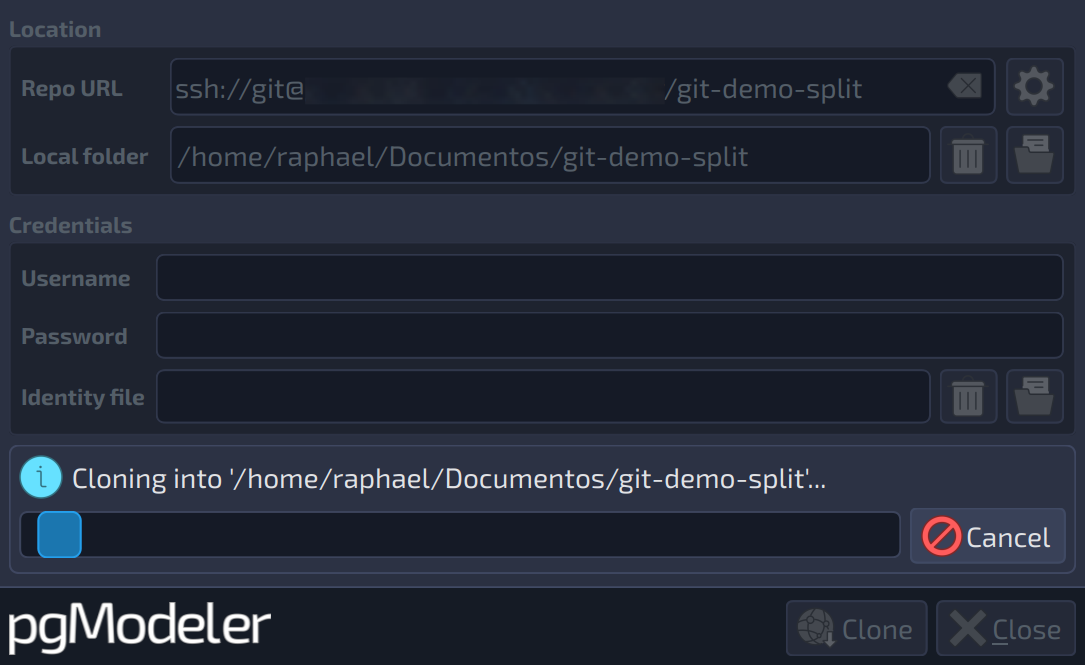
- Clone remote repositories. You can download an entire Git repository straight from the plugin's interface, with live progress as data transfers. The process supports both username-and-password authentication and SSH keys, and can automatically open the models found in the cloned repository as soon as the download finishes.
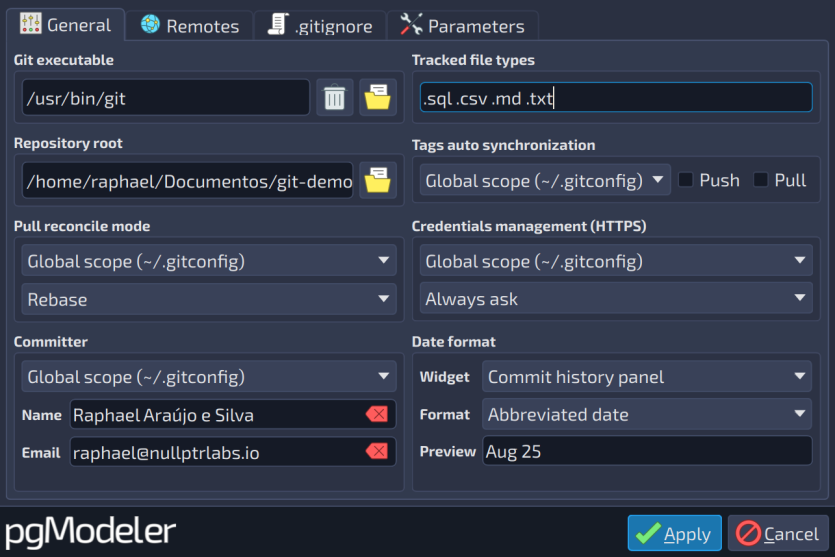
- Manage remote connections. Adding, editing, and removing remote repository addresses is now centralized in the plugin's settings, including support for multiple push destinations on the same remote. SSH keys you provide are stored and automatically reused for future operations.
-
Organize exactly what goes into each commit. A new dedicated panel lets you choose exactly which changes will be part of your next commit, file by file, with filters to make things easier to find and a side-by-side view that shows exactly what changed before you commit. Models split across multiple files are fully supported as well.
-
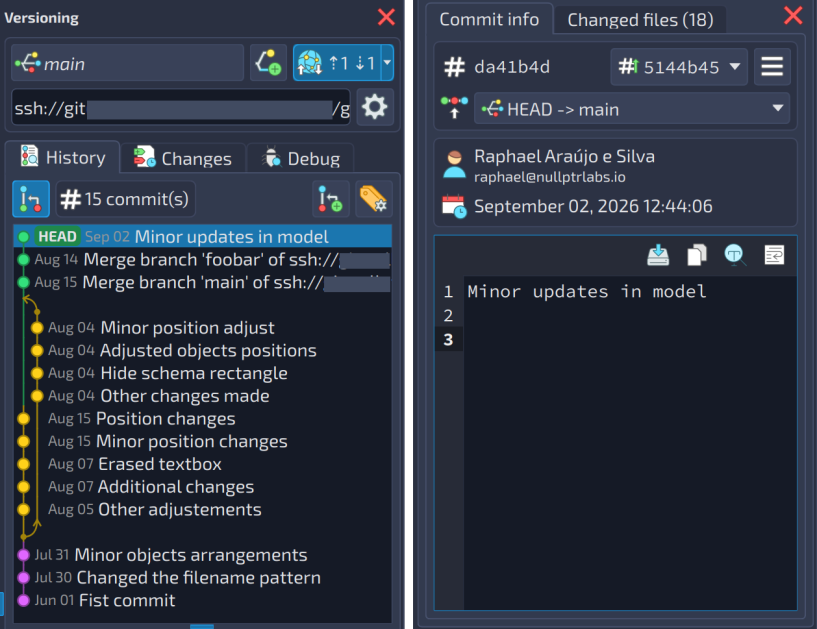
Push, pull, and sync changes. Push and pull actions are now available directly on the toolbar, with a combined sync action for convenience. The strategy used when pulling changes — merge, rebase, or fast-forward only — can be configured to match your team's preference, and the branch indicator clearly shows whether there are pending changes to push or pull.
-
Resolve conflicts with guidance. When a merge or pull results in conflicts, the plugin switches into a dedicated conflict mode that locks out potentially risky actions until everything is resolved. You can compare all three versions of each conflicting file — the original, yours, and the remote one — choose which one to keep or edit the result directly, and then finalize or cancel the operation safely.
-
Merge branches. The branch manager now lets you merge any branch into the current one, clearly showing the source and target before you confirm the operation.
-
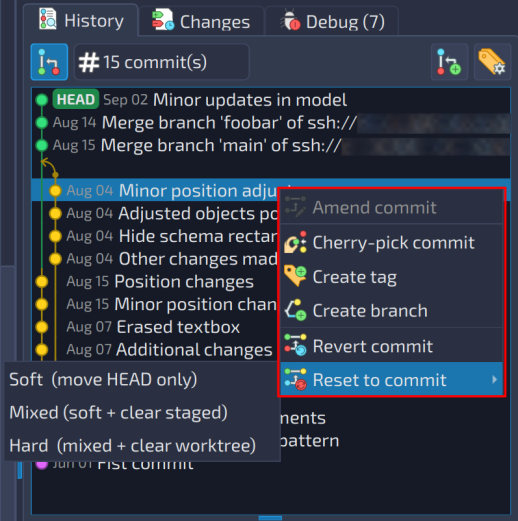
Fast, one-click commit operations. A whole set of commit-level actions is now just a click away from the history view: bring a specific commit over to the current branch (cherry-pick), even if it's a merge commit, with the plugin automatically handling the technical details for each case; fix the last commit directly, correcting its message or adding a forgotten file without creating a new history entry; roll the repository back to any previous commit, with the different Git reset modes available (soft, mixed, or hard) depending on how much you want to discard; or undo a specific commit without rewriting history, by creating a new commit that reverses its changes — a safer way to reverse something that's already been shared with the team.
-
Manage tags. A dedicated tag manager lets you create, remove, and sync tags, including annotated tags, with the option to push them to the remote repository or fetch the ones that already exist there.
-
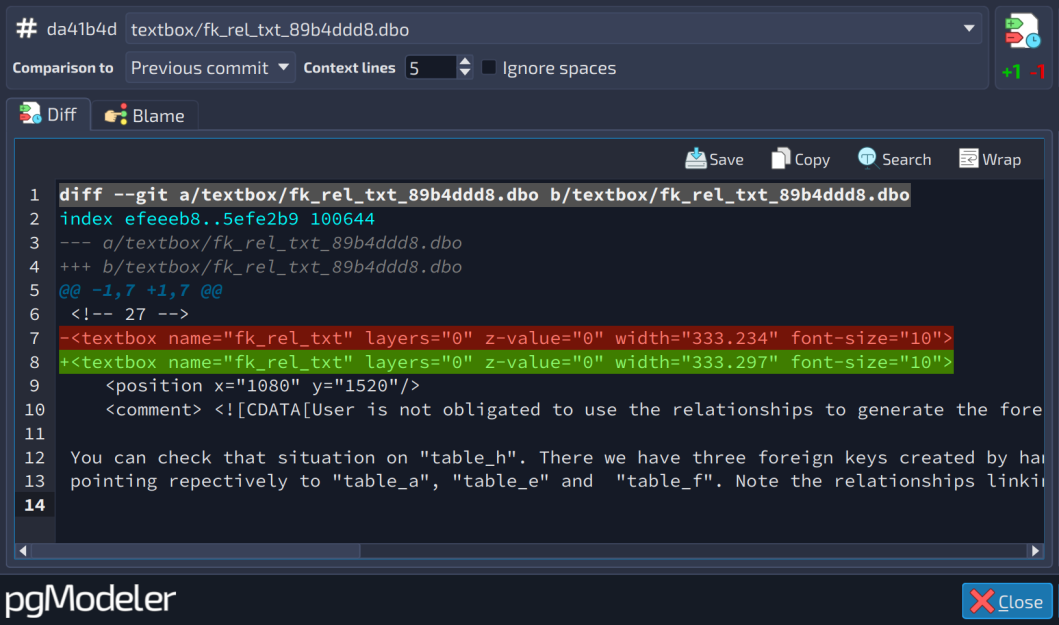
Inspect a file's history in detail. A dedicated window lets you compare a file's changes between any two commits, as well as view its blame — seeing exactly which commit introduced each line of the file. It's a handy way to understand how a specific part of a model evolved over time, or to figure out when and why a particular change was made.
-
Stash work in progress. Uncommitted changes can be temporarily set aside at any time, with a list showing the date and a preview of the differences for each stashed entry. Each entry can be applied, removed after being applied, or simply discarded — and you can also clear everything at once.
-
SSH authentication without repeated password prompts. The plugin now automatically integrates with the system's SSH agent, so keys already loaded there are recognized without requiring the password to be typed again for every operation.
-
Support for the Git credential manager. Setting up the credential manager for authentication on HTTPS remotes is also simpler now, all from within the plugin's settings.
Put all of these together, and the scale of the leap becomes clear: what used to be a basic history feature has become a complete Git workflow, built for teams and individual developers alike who want to keep their database models under version control without ever leaving pgModeler.
pgModeler Plus is now more accessible to students
Alongside this release, pgModeler Plus becomes more accessible to a new audience: university students. A 50% discount is now available to students who want to use the extra features of the commercial version, including the new Git plugin covered above.
To request the discount, students just need to fill out this form with a valid institutional e-mail address from an accredited educational institution (personal or disposable e-mail addresses won't work). The discount applies to a fixed license configuration — 1 seat, 1 platform, and a 6-month term — and each discount code can be used only once. If a code goes unused, a new one can't be requested until the previous one has actually been redeemed, and once a code has been used, a new one only becomes available again 6 months later.
It's a small step, but one that matters: it opens the door for students to get hands-on with the same professional tooling used by teams in production, at a price that fits a student budget.
What's next
With this release, the pgModeler Plus versioning plugin is considered feature-complete for the 2.0.0 release. From here until the final release, the focus shifts to stability testing across platforms, addressing community feedback on the core application, and polishing any remaining rough edges found during this beta phase. As with any beta release, it's worth keeping in mind that bugs and unexpected behavior are still to be expected at this stage — that's exactly what this phase is for. If you run into anything odd while testing, please report it: every issue reported will be looked at and fixed as quickly as possible.
If you model databases as part of a team — or even on your own, but like keeping an organized history of your changes — now is a great time to try pgModeler 2.0.0-beta1 and see how built-in Git changes the workflow.
Add new comment